Why Personal Branding Matters More Than Ever in the Age of Artificial Intelligence

As Artificial Intelligence (AI) generated content continues to flood digital platforms, audiences are being swamped with more noise than ever before. While this offers efficiency and volume, it also creates an issue: sameness. If everyone can publish quickly and cheaply, what sets you apart?

The answer is one of the few differentiators that can't be replicated overnight: trust. And trust is built through personal branding.

The Rise of Distrust in Traditional Channels

Recent research shows that trust in conventional brand messaging is eroding. In New Zealand, 73% of consumers say they trust companies less than they did a year ago (Salesforce, 2024). In Australia, only 3% of people report trusting social media influencers (Australia Talks, ABC). This signals that audiences are growing more sceptical and discerning about who they buy from and listen to.

While we don’t yet have regional data matching US figures — where 74% of people are more likely to trust someone with a strong personal brand, and 63% are more likely to buy from them — the message is clear: people buy from people they trust. In today’s climate, that trust must be earned and visible.

Start With Who You Want to Serve

Before crafting your personal brand, don't start with why. Start with who. The moment you're clear on who you're serving, every decision becomes more straightforward and more effective. You'll know:

  • Where to advertise
  • What kind of language and tone to use
  • How to price your offerings
  • What services to include
  • Who to hire and how to structure your team

On the other hand, trying to appeal to everyone leads to generic messaging and commoditised services. Specificity is what builds authority and resonance. The clearer you are about your audience, the more meaningfully you can show up for them, and the more effective your personal brand becomes.

Personal Branding in the AI Era

AI can generate content at scale — but it can’t replicate your personality, lived experience or empathy. In this context, a personal brand becomes your filter, enabling you to build credibility and foster connections.

A strong personal brand helps you:

  • Stand out in saturated digital spaces
  • Attract high-quality leads who already trust you
  • Be remembered and referred to
  • Align your content with your values and style
  • Build long-term relationships beyond transactions

It’s not about being everywhere — it’s about showing up where it counts, in a way that feels real and consistent.

The Three E’s of Personal Brand Content

To generate exposure, your content (of which video will play a key role) must connect with your audience on an emotional and practical level. The most effective personal brands use content strategies built around the three E’s — entertainment, education and encouragement. Each one serves a distinct but powerful role in attracting attention and building trust.

Entertainment: Build Connection Through Personality

Entertaining content brings your personality to life. It might be witty, light-hearted or creative — anything that makes people smile or want to keep watching. Importantly, it doesn't mean you have to be a performer or comedian. It simply means showing up with personality and authenticity.

Example:
Chris Parker, a New Zealand comedian and writer, is an entertainer by trade, but it’s not just his humour that makes his personal brand so engaging. It's his openness, relatability and the way he uses everyday life to connect with his audience. His social media content blends humour with vulnerability, making him feel both entertaining and approachable — a reminder that great content doesn't need to be polished, just real.

Education: Offer Practical Value Without the Sales Pitch

Educational content is what makes people return to your platform. When you consistently offer insights, tools or tutorials that help people solve a problem, you establish authority. You become known as someone helpful — not just someone who’s selling.

Example:
Mari Smith, widely known as the “Queen of Facebook,” has built a global personal brand by teaching businesses how to use social media more effectively. Her content is clear, actionable and deeply strategic — whether she’s posting live videos, LinkedIn insights or long-form guides. She doesn’t just share tips; she creates genuine value that positions her as a trusted educator and thought leader in her space.

Encouragement: Create Emotional Resonance and Loyalty

Encouraging content taps into your audience’s mindset, hopes and struggles. It’s about helping them feel seen, supported and motivated. This is particularly powerful in service-based businesses or mission-driven brands.

Example:
Lisa Messenger, founder of Collective Hub, builds much of her personal brand on motivation and resilience. Her posts often mix storytelling with encouragement, making her brand emotionally sticky and deeply personal.

The best personal brands combine all three elements — they educate, entertain and encourage, creating a rich content ecosystem that builds trust over time.

Expert Recap: Why Human Brands Will Always Stand Out

In an age of mass-produced content, your personal brand is the most powerful tool you have to cut through the noise and create a real connection. It’s not about being polished or perfect — it’s about being authentic, helpful and consistent. Start with who you’re here to serve, show up in a way that reflects your values and voice, and create content that your audience actually wants to see.

As content becomes faster, louder, and more automated, the brands that win will be the ones that still feel human.
Why No One Can Guarantee First Page Rankings

Many SEO companies promise first-page rankings to attract clients but the reality is that no one can guarantee such results. Search engine algorithms, particularly Google's, are complex and constantly changing. Rankings are influenced by numerous factors, including competition, keyword difficulty, and user behaviour, making it impossible to ensure a specific ranking. When a digital marketing agency guarantees first-page rankings, it’s a sign that you should steer clear.

No one can guarantee a #1 ranking on Google

Google itself warns: "Beware of SEOs that claim to guarantee rankings, allege a 'special relationship' with Google, or advertise a 'priority submit' to Google. There is no priority submission for Google. The only way to submit a site to Google directly is through our Add URL page or by submitting a Sitemap, and you can do this yourself."

SEO is about 75% knowledge and expertise and 25% ‘educated-guessing’. Google is transparent about some aspects of what they’re looking for when ranking sites but frustratingly opaque in other facets. Whenever there’s an algorithm update, SEOs spend weeks puzzling over clues to determine the changes that were made and the impact on sites.

No one has complete insight into what propels a site to the top of the search results. What we know are the best practices that websites need to follow and some pro tips to give you a competitive edge, but there’s still some (educated) guessing involved.

Basically, you can’t guarantee something you have no control over. SEO agencies don’t make the rules; Google does.

What Dubious SEO Companies Have in Common

So, what’s the deal with SEO companies that promise first-page rankings? While they might get you on the first page of Google results, there’s often some fine print involved:

  • Obscure Keywords: They might rank your site for long-tail keywords with very low search volumes, offering minimal value.
  • Paid Advertising: Some use Google Ads to place your site on the first page, which isn’t the same as organic SEO and requires continuous payment.
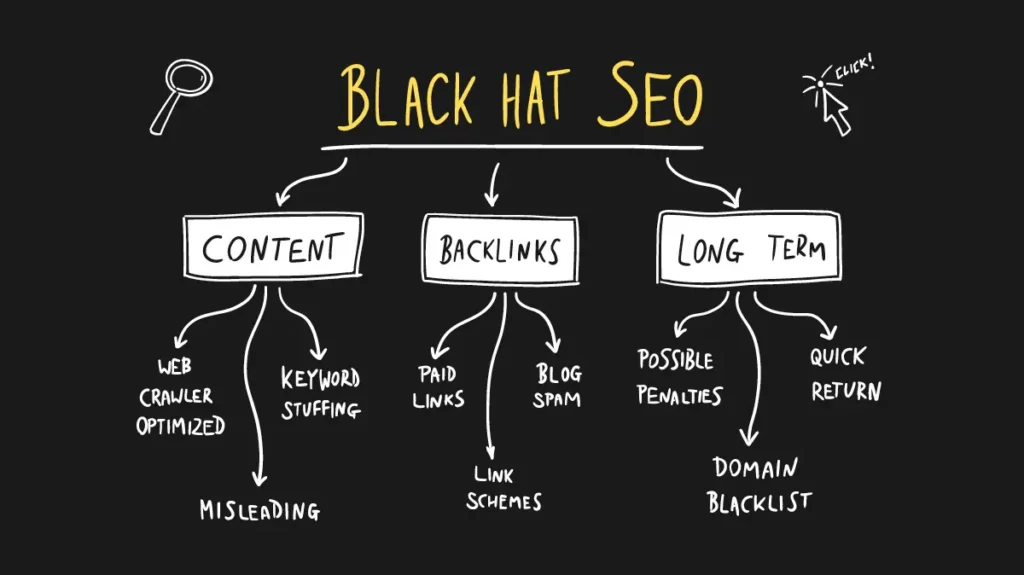
  • Black or Gray Hat Techniques: These can temporarily boost rankings but often lead to penalties from Google, harming your site in the long run.
  • Artificial Traffic: Some use bots or manipulative tactics to inflate traffic numbers, which don’t lead to genuine engagement or conversions.

What Can Help You Rank Higher With Google

First, hire an SEO company that doesn’t make promises they can’t keep. A qualified SEO firm will promise deliverables like:

  • Keyword Research: Finding the right keywords means striking the right balance between too broad and too narrow. An SEO agency will conduct in-depth research to identify the terms people use to find your business, as well as those used to find your competitors.
  • Content Creation: Producing quality content regularly is key. It should be well-written and useful, not just churned out using AI. High-quality content engages your audience and provides value.
  • Site Optimisation & Technical SEO: SEO isn’t just about keywords and links. Google values user experience - this includes site speed, mobile usability, and the overall structure of your website.
  • Link Building: This involves outreach and establishing backlinks from reputable sources. Genuine link building is essential for SEO but can't be guaranteed in terms of numbers.
  • Google Business Profile (GBP): For small businesses, actively managing your GBP can significantly improve local search rankings.

A Few More Things to Look for in an SEO Agency

  • Transparency: Your SEO agency should be open and clear about the strategies they're implementing and the progress being made.
  • Responsiveness: Expect timely responses to your queries and proactive communication about your campaign's status.
  • Training: A good SEO consultant will provide training to help you understand the basics of SEO and how you can help maintain your rankings.

Realistic Expectations: Effective SEO is a Long-term Investment.

Immediate results are rare, and it often takes several months to see significant improvements. Be wary of companies that promise quick fixes or guaranteed rankings.

By understanding these points and setting attainable targets, you can make informed decisions and achieve sustainable growth through effective SEO strategies.


Instagram’s Latest Updates for 2022

Instagram has kept us hopping this year! Our team has noticed several new features added to Instagram's reels, posting functionality, API, and more... Let's have a look at the latest updates and how they can work in your favour.

Pinned Posts or Reels

Instagram has launched a new feature to allow users to pin up to three posts or Reels to the top of their profile grid. For users of Facebook, this tool will be familiar as we have always been able to pin posts to the top of the Page.

The ability to pin a specific post to your profile is a welcome feature for users who want to highlight their favourite posts that may have been buried somewhere in their photo grid. The feature could also be useful for those who post frequently but want to highlight a specific post. Currently users have the option to pin Stories to their profile and now also their posts or Reels.

How to Pin a Post:

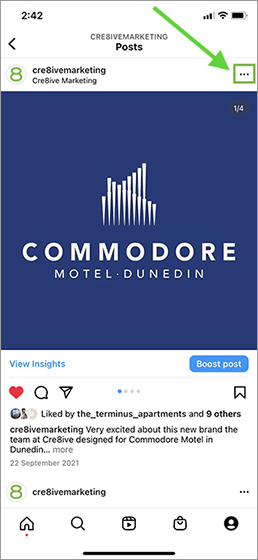
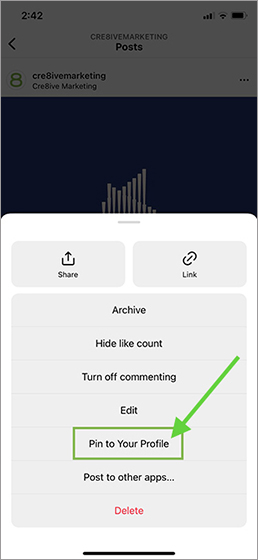
  1. Select a photo or reel on the navigation page
  2. Click on the three dots in the top right corner
  3. Select “Pin to your profile” and that’s it!
Cre8ive Marketing Dunedin Digital Marketing Agency Instagram Post
Cre8ive Marketing Dunedin Digital Marketing Agency Instagram Pin to Profile


Once you have pinned a post, it will appear on the top of your profile page with a push-pin icon. To unpin a post, enter your profile page, repeat the steps above and select “Unpin from your profile”.

Auto Captions on Reels

Want to watch a Reel without disturbing others? Auto captions function in Instagram can help you do that.

Rolling out earlier in 2022, this feature will let viewers watch a Story or Reel without having the need to turn on their volume. Anyone speaking in the video – their words will be automatically displayed in the caption. By default, it's turned on to make Reels more accessible and easier to consume.

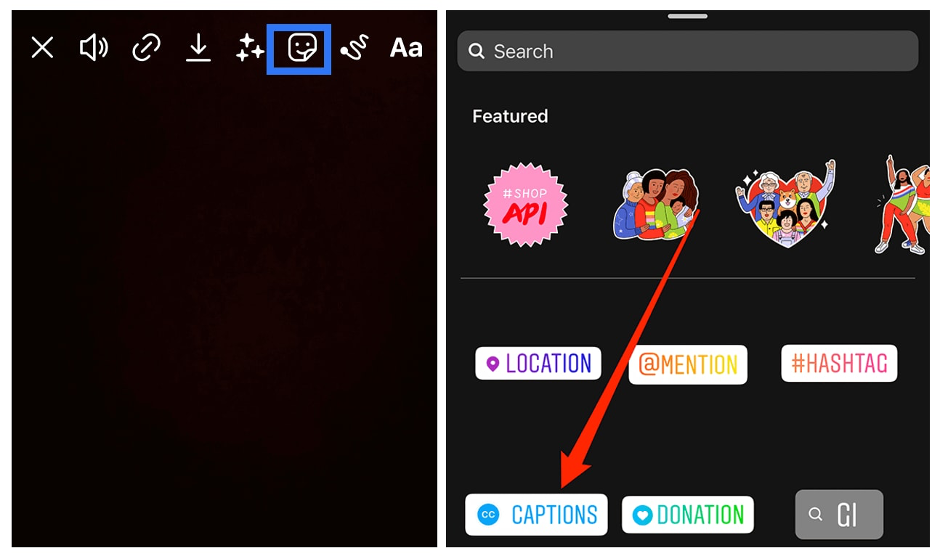
To turn on the auto caption for the Reel you are watching, simply click on three dots on the top right corner of the Reel -> manage captions -> turn on the “Captions” button. To add Auto captions to the Reels you are creating, click the “sticker” button and select “CAPTIONS” in the list.

Cre8ive Marketing Dunedin Digital Marketing Agency Instagram Auto Caption


90 Second Reels are Here

Now you can create a longer video, up to 90 seconds. The time limit expansion should provide users the opportunity to better communicate with their audience and showcase their offerings.

"You will have more time to share more about yourself, film extra behind-the-scenes clips, dig deeper into the nuances of your content, or whatever else you want to do with that extra time," says the official Instagram blog post.

New Stickers for Reels

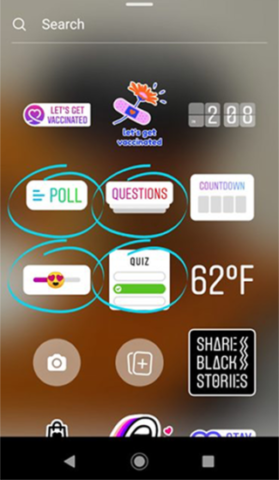
The Poll, Quiz, and Slider stickers, previously only available in Stories, will now be available on Reels as well.

Try to poll your audience on questions, test your viewers’ skills, and ask them to share their feelings by adding Instagram stickers to your Reels.

No matter the content of your Reels, these will increase a level of interaction for your audience.

Cre8ive Marketing Dunedin Digital Marketing Agency Instagram Reel Sticker


Templates for Reels

Instagram now allows you to select the existing Reels and use them as templates to create your own!

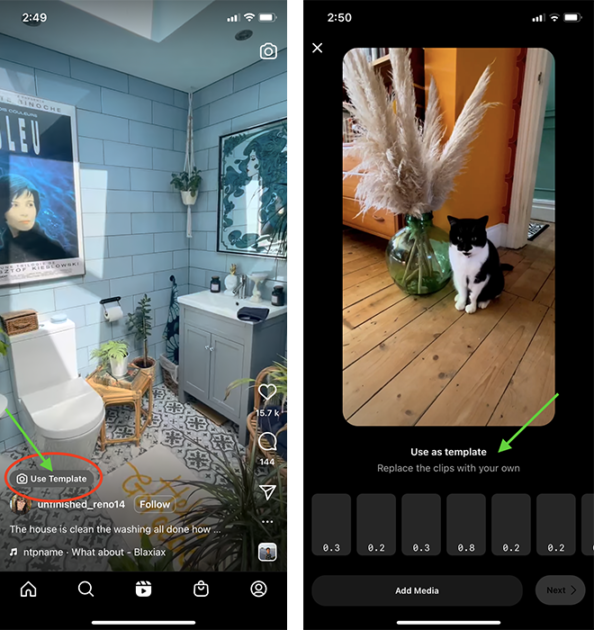
When you find a Reel that has a “Use template” button above the poster’s user name, you can click on that button and enter the template editing interface.

Simply on “Add media” button and add or replace media sources inside. You can add both photos and videos as materials for your new Reel. Once you have finished, you add stickers, audio, and special effects as normal.

With this function, it is now easier than ever for you to easily create Reels without having to spend all your time editing and creating them from scratch.

Cre8ive Marketing Dunedin Digital Marketing Agency Instagram Use Templates


Import Own Audio to Reels

The updated Instagram now allows you to add your own audio (voiceover, sounds, music, conversations, etc.) into your Reel-making!

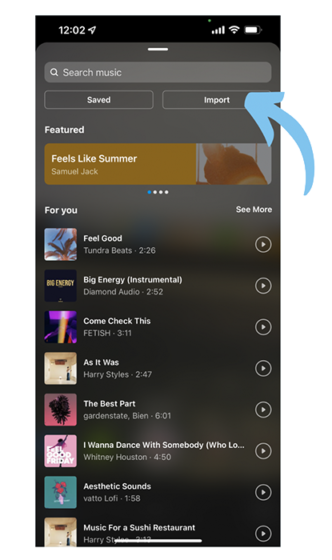
You can save the desired audio file to your local mobile storage and add it as your own audio to your Reel. You will see the new button called “Import” next to the “Saved” button once you click on the “Music” icon when making your Reel.

Cre8ive Marketing Dunedin Digital Marketing Agency Instagram Import Audio


API Opened Up for Reels

With Instagram Meta announcing that it is launching the Reel APIs for external uses, the third-party platforms will be able to create and schedule Reels and manage related activities in their Instagram accounts.

With API access, third-party platforms like Hootsuite, Later and Sprout Social can keep track of their social posts much easier and they can track cross-platform posts and activities in one place. The current API enhancements include Content Publishing, Insights, Comment Moderation, Hashtag Search, Business, Discovery, Mentions, Promote API, and Instagram Basic Display API.

Reels Cross Posting

Want to create a Reel for different platforms? Instagram’s new cross-posting function makes it easier to do that. Now you can automatically cross-post Instagram posts, Stories, and videos (Reels) to Facebook.

To check your cross-posting settings, tap your profile picture, then the menu icon. Choose “Settings” -> “Account” -> “Sharing to other apps” and then you can see the accounts liked to your IG account.

A great way to re-purpose your content and extend your reach!

More NFT Testing

Another new feature coming on Instagram Meta! Instagram Meta is now testing non-fungible tokens (NFTs). The token collection is expected to include art, images, videos, music, and trading cards. The initial test involves a small select group of U.S.-based creators and collectors. For this test phase, they're expanding access to more countries, so it won't be long until NFTs are widely available on Instagram.

Provide/Get Quotes for Services on IG

One more new function on Instagram Meta – they are testing a “Get Quote” button with select businesses. This button will allow the users to create questions in their profile or add a “Get Quote” sticker to their Stories to ask their customers questions.

Once customers fill out the questionnaire, they can then quickly request a quote from the business about a product or service. This new feature facilitates e-commerce leads and business-customer conversations.

Instagram's New 'Notes' Test

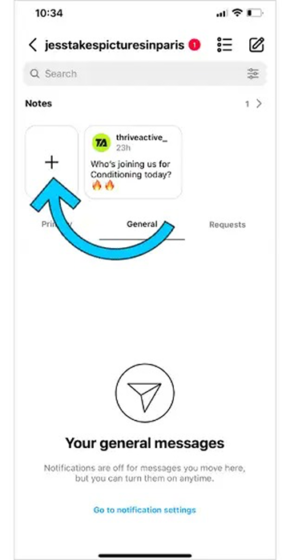
Instagram is also testing a new message function called “Notes”.

On the top of your inbox page, the user can create notes and see the notes created by their followers whom they have also followed back. You can create and share a note by clicking on the “+” button, inputting the message (no more than 60 characters), and sharing it with whoever you want to send the messages to.

Replying to a note will trigger a chat thread with the note creator, which will be private and only accessible to two of you. The notes are going to remain on your page for 24 hours and will be deleted automatically after that.

As it is still in the testing stage, it may not appear on all the users’ devices now but it is already on its way!

Cre8ive Marketing Dunedin Digital Marketing Agency Instagram New Notes

InShot: All-in-one Video Editor


We know there are a multitude of benefits that video can have for businesses. However, more often than not people feel out of their depth when creating video content. Inshot is a video editing app which can be a game-changer for businesses wanting to create engaging content for their audience but just don’t know where to start.

InShot is a feature-rich app that lets you drill down into all sorts of editing and enhancement options. Just about everything you’d want to edit on a video can be done within this one app, and there are all different payment options so you can invest as much or as little as you want.

Some of the video editing features that InShot includes are:

  • Video trimming
  • Video splitting
  • Merging video clips
  • Importing photos or images
  • Applying various filter effects
  • Adjusting speed of video
  • Adding music or sound effects
  • Adding voice-over effects
  • Adding animations, stickers or text to videos

Steps to using InShot Video Editing App:

1) Download the app

First off, you’re going to need to download the free app from either the Apple store or Google play. 

2) Import and edit videos and images

The InShot app serves as a 2-in-1 editing tool because you can also edit photos. When you open the app, you’ll be asked to choose between importing photos and videos, editing photos and videos, or making a collage.

Once you select a photo or video to edit you should first adjust the canvas. For example, we recommend 1:1 or the square aspect ratio for video posts on Facebook and Instagram and 9:16 for Reels/Stories. From here you can crop it, trim it, add a background or integrate other visual and sound effects. These basic video editing tools are pretty decent for a business but there are far more exciting tools on offer.

3) Add sound and music

After you’ve made basic edits to your photo or video, you can then add sound effects, voice-over effects or music. InShot gives you the option to import a song from your device, or choose from the app’s music collection.

After you’ve selected sounds and music, you can control the volume of each using sliders.

4) Add text

Next, you’ll be able to add text onto the video. There is a wide array of font styles and colours to choose from. The text can be moved around the screen to get the perfect placement. InShot allows you to select start and end times for when you want the text to appear and disappear in your video. 

5) Add  animations and stickers

Inshot allows you to add custom animations, stickers and GIFs to your video for that fun, personal touch. 

6) Save and share

Once you’ve finished editing your video, all you need to do is hit the ‘save’ button in the InShot app. This will begin the rendering process, which may take some time. Once rendering and conversion is complete, the video will be saved and can be easily accessed in your Inshot gallery. From here you can share it directly to your social media channels.

InShot Pricing

The free version of InShot has a wide variety of tools you can access. However, if you like the app and plan to use it a lot, you’ll probably want to upgrade at some point, or at least spend some money on the enhancement packs you’ll use over and over. You can either do one-off purchases of enhancement packs or be a subscriber.

InShot Pro is the app’s premium version and it doesn’t have any limits on the effects, filters, stickers and transitions you can use. Plus, you won’t see the InShot watermark on your creations and there aren’t any ads.


Why Offering Too Many Options is Detrimental to Sales: The Paradox of Choice

It is a common mistake for a business to think that the more products and services they offer, the more revenue they will make. An increasing body of studies indicate that this isn’t actually the case.

It all has to do with choice. Intuitively we consider choice to be largely beneficial as it indicates that we have autonomy over our decisions and it ultimately gives us a sense of control. However, the relationship between choice and well-being isn’t so straight-forward. The paradox of choice was first discovered in 2000 by two Sanford psychologists. Their study was conducted at a local food market. On the first day there was a display table with 24 different kinds of jams. The following day at the market, people were only given a selection of 6 jam flavours. The larger display attracted more interest than the smaller one however, when it came to purchasing, people who saw the large display were one-tenth as likely to buy as people who saw the small display.

This study, as well as others, has provided evidence for the idea that choice ‘paralyses’ consumers. Overloading a customer with choice will lead to them being far less likely to make any purchase at all. What is more, if they do end up making a decision, the choice overload will reduce their satisfaction with that decision. Even if it was the right choice!

It is important to ask yourself whether or not you are offering too many choices to your clients. Ultimately, there is a diminishing marginal utility in providing alternative choices. If you can understand that each new option will subtract from the feeling of well-being your client walks away with, then you may realise that you’re offering too much. Psychologists have shown us that more options to decide between requires increased time and effort and can lead to anxiety, regret, excessively high expectations, and self-blame if the choices don’t work out. By reducing the amount of choice you offer, these impacts become negligible.

Obviously choice does provide some benefits, the more shoe sizes a store offers, the wider their customers base will be. However the paradox of choice requires us to think about the balance of how many products or services businesses create. You can overwhelm your customers with too many options and this could lead to indecision and consequently nothing purchased. A business that can understand the fickle balance of choice will be amply rewarded.


How to Generate a Google Review Link for Your Customers

Customer feedback is one of the most valuable resources for any business. Understanding what your customers love about your products and services, as well as what they wish could be better, can provide valuable insight to both your business itself, and for future customers.

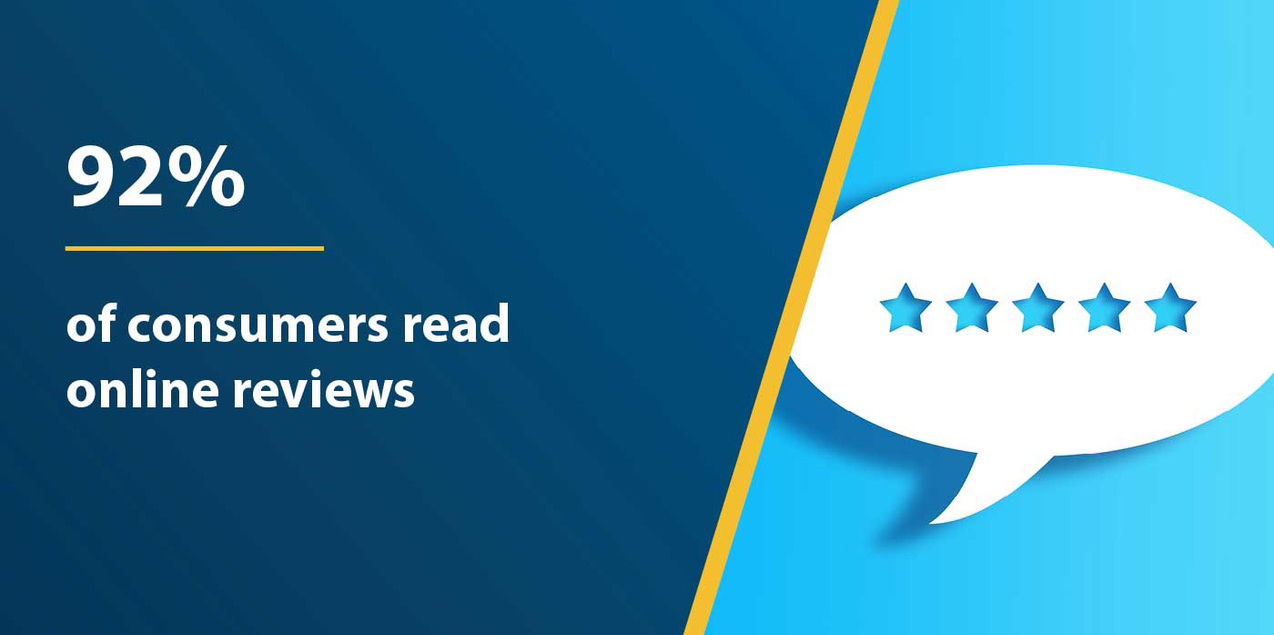
Research has shown that prospective customers look at reviews while considering buying products or services.

Customers may choose not to use your company and go elsewhere if you don’t have any reviews, even if your company does great work and has a great reputation.

How to Make it Easy for Your Customers to Leave a Google Review

Many customers often don't leave a review after having an experience with a business, simply because they were not encouraged to give feedback or they didn’t know how to. Providing a review link soon after they make a purchase or experience one of your company’s services will help generate feedback.

The review link brings them directly to your Google My Business listing where they can easily give their input on how their experience went. A little encouragement on your end can go a long way for your business’ future success!

people read online reviews


Google offers an easy way to generate a review link direct to your Google My Business listing's review section - just follow these steps:

Step 1: Create your @shortname
Log into your account to create your @shortname - a new feature Google added in the dashboard. This is an important part of your listing, so choose carefully. The best names will be simple and easy for people to understand and remember. By creating your business' short name, it will be contained in the link, instead of random letters / numbers.

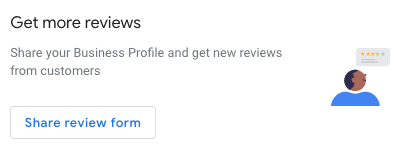
Step 2: From the home tab, scroll down and you will see "get more reviews."

share google review link


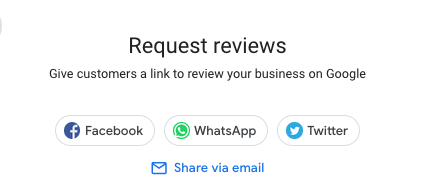
Click on this and you will have a couple of ways to share the link - if you click on 'email' you can copy the link for future use.

request google reviews


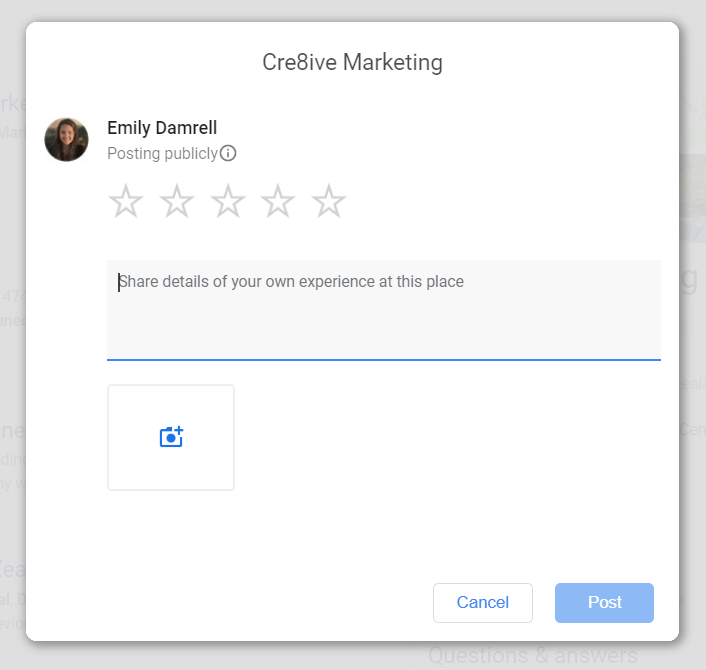
The review link will bring users to a page which looks like this:

If you need any assistance with your Google My Business listing or would like a Google My Business audit to see where improvements can be made with your listing, get in touch philippa@cre8ive.co.nz. Our audit also includes our comprehensive, step-by-step guide with our best tips and actionable tactics to help you get more visibility on Google, generate more leads and engagement.


5 Top Tips for Brand Communications in Uncertain Times

How do businesses navigate this new landscape of professional and personal challenges due to COVID-19, which begs the question:“What’s next for marketers trying to create successful marketing and social media campaigns after a crisis?”

1. Communicate

The most important factor for any business is to simply keep up regular communication - whether it’s via social media, email or the website. Let your customers know what you’re doing to help them, not add to their stress. If appropriate let them know of any increased safety and cleanliness measures you’re taking in whatever way makes the most sense for your brand.

  • RELEVANT - Focus on what is relevant to the audience and do so with empathy and understanding.
  • BE CONCISE People are receiving a lot of communication right now, so be sure you get right to the heart of what you have to share.
  • SHARE POSITIVITY Feel-good stories are especially appreciated in trying times. If it feels appropriate, share positive or inspiring stories that give your audience hope and reassurance.

2. Leverage Your Social Media Channels

Develop genuine relationships with less focus on selling. Social media is where you want to engage with your audience - talk with them, not at them. It’s time to review your content strategy and refocus to the new norm.

3. Exceptional Customer Service - Online and Offline

Whether you are interacting on social media, email newsletters, online chat, on the phone or in person at your bricks and mortar premises - all of these interactions must be continually about providing exceptional customer service.

4. Be Intentional and Have a Clear Strategy

Marketing during a crisis is about showing your customers who you are as a brand. Developing a clear plan is even more critical to being a responsive and focused brand.
Digital Marketing is critical during times of uncertainty to help your business or organisation continue to connect and ultimately generate revenue.

5. Adapt for Now, Plan for the Future

Currently, there is still much uncertainty regarding the COVID-19 pandemic - how far it will reach or what the final impact will be. Regardless of what the uncertainty surrounds - whether a virus, earthquake or other impact that occurs beyond our control, for marketers and business leaders, it’s important to be flexible and adapt for now, but to continue to plan for the future.


Introducing Our New Senior Graphic Designer

Introducing our new Senior Digital Designer Adeline Michon. Adeline has Visual Arts Degree and a Higher Certificate in Graphic Design, Publishing and Advertising from France. She has worked with clients such as L'arc National Theatre, L’Embarcadère Culture and Congress Centre, International Antarctic Centre and Natural Ozone.

Adeline designs with a holistic perspective, ensuring that there is a connection between her designs and the client’s brand story. She is excited about being able to tap into and learning more from the cross-disciplinary resources at Cre8ive.

When she’s not at Cre8ive, you will find her dressed in snow gear hitting the slopes or skydiving, or closer to home enjoying the theatre. We are so very ‘heureux' to have you at Cre8ive Adeline and the touch of ‘Frenchness’ you will bring to our agency and clients!

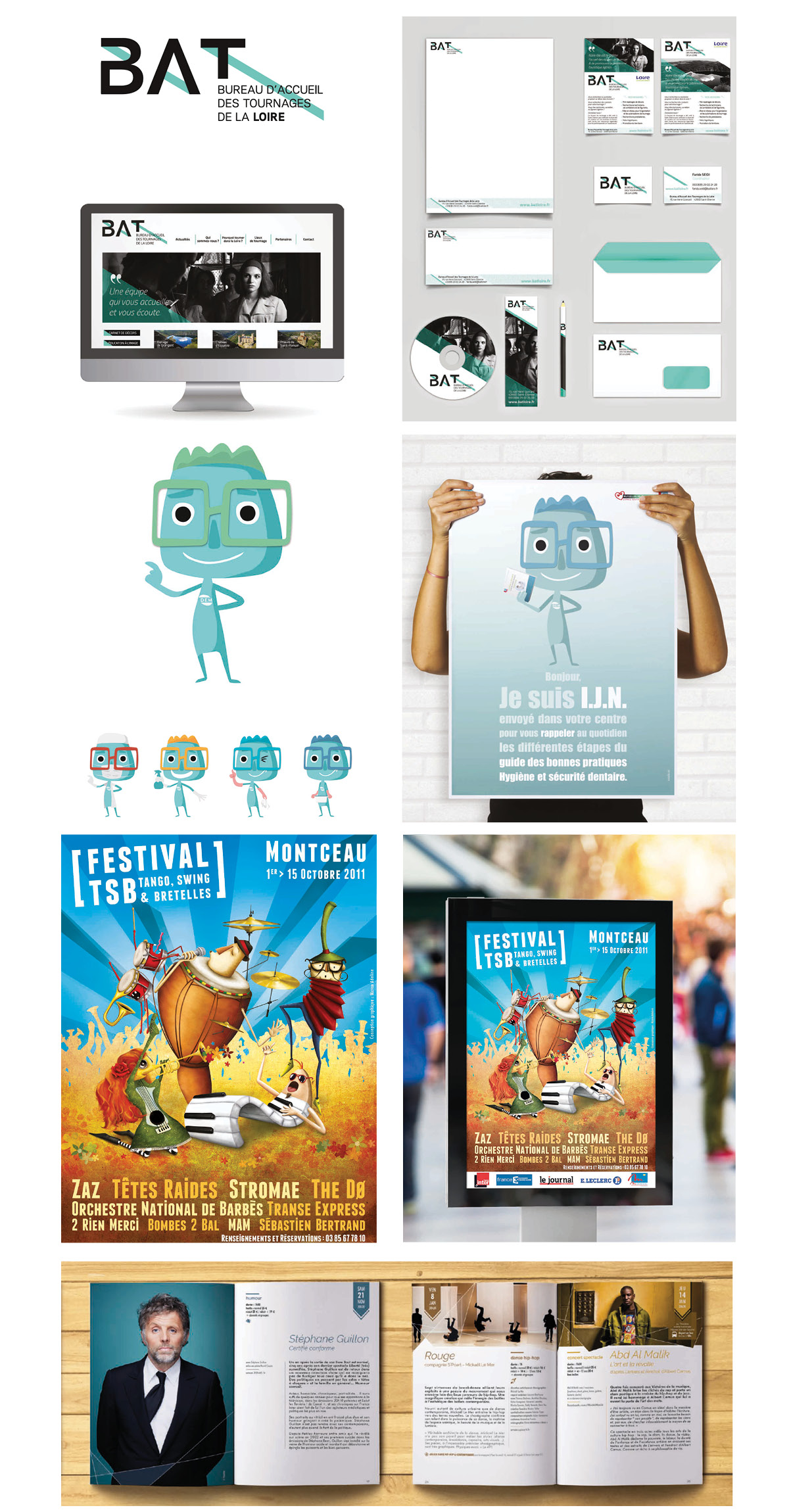
Some of Adeline's design work:

Adeline Michon Cre8ive Graphic Design Portfolio

Should You Upload Your Video to Facebook or YouTube?

The world’s largest social media marketing resource, Social Media Examiner® helps millions of businesses discover how to best use social media to connect with customers, drive traffic, generate awareness, and increase sales. They offer original and comprehensive articles, expert interviews, original research, and the news businesses need to improve their social media marketing.

They received a variety of feedback from their fan base - some were shocked and disappointed as they don’t view YouTube as a social platform. However, most applauded the move because they don't watch videos on Facebook. Instead, YouTube is their preferred place.

Founder Michael Stelzner likes to use this analogy “it’s kind of like putting a TV show on a highway and expecting people to watch it as they go zipping by. And Facebook is a highway"

The Results

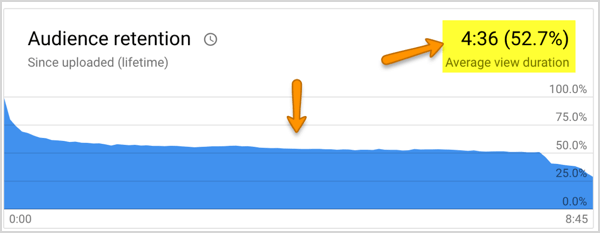
They published the behind-the-scenes documentary called "The Journey" exclusively on YouTube. It's their ongoing story about how they market. Each show is about 7 minutes long and offers a peek into the real struggles and discoveries made by their marketing team.Their results showed that on YouTube, about 50% of the people who watch each episode actually make it to the end. That is exceptional compared to Facebook, which is almost always less than 1% for the exact same content.
The misleading part:
It "looks" like a lot more people are watching on Facebook because the view counts are deceptive. Facebook counts what's really a drive-by impression of 3 seconds as a view. On YouTube, a view is 30 seconds or more (although this has recently been changed to 10 seconds.)If you receive 5000 video views on Facebook and 1% make it to the end, that's 50 people. If you get 1000 views on YouTube and 50% make it to the end, that's 500. That's a 10x improvement and the Social Media Examiner team decided they would rather have 500 people make it to the end, not 50.


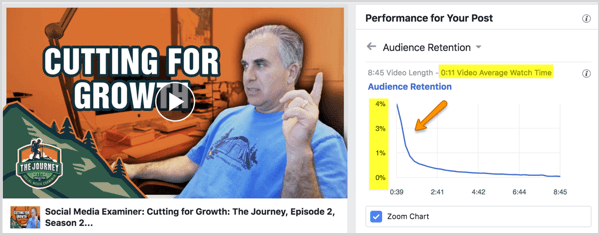
YouTube is where people prefer to watch videos that are longer than a few minutes. Here’s what a typical video’s retention looks like for Social Media Examiner on Facebook:

This pattern they witnessed over and over.

Despite the fact that Social Media Examiner has a significant fan base of 534,000 on Facebook and a small but growing one on YouTube (23,000), the data is clear. It's YouTube for the the long-form video content from now on for them.