Latest Instagram Updates You Need to Know

With over 1 billion users, Instagram has grown to be one of the most influential social media platforms in the world. It is known to generate the highest engagement rates out of any platform, because of this, it pays to keep on top of all the movements and evolutions that are occurring within the site.

Here are just a few of the latest updates that all digital marketers should be aware of.

Reels Expands to 60 Seconds

While Reels were originally limited to 15 seconds and then quickly expanded to 30 seconds, we've been limited to that for a while. But now, all users should have access to the option to create 60 second Reels.
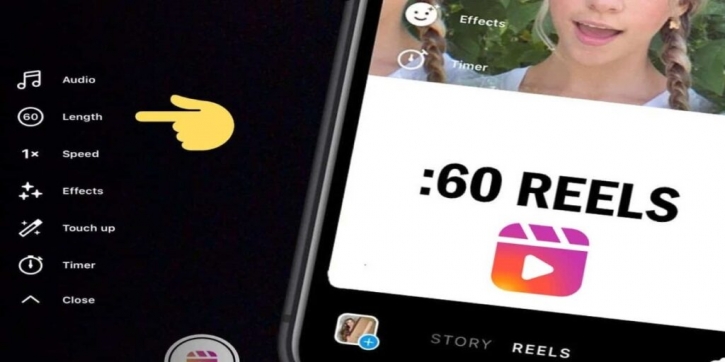
instagram reels now 60 seconds


New Reels Effect Grid

In another move to imitate TikTok, Instagram Reels have a new ‘Effects’ area and the grid where you choose your effect looks very TikTok-esque. If you haven't noticed it yet, go to Reels and select ‘Effects’ to see the new layout.

Facebook Shops

Facebook (owner of Instagram) has recently made a huge step into eCommerce by introducing Facebook Shops that are accessible though both Facebook and Instagram. Put simply, businesses can now create customisable catalogues of their products that users can browse, save, share and purchase from.
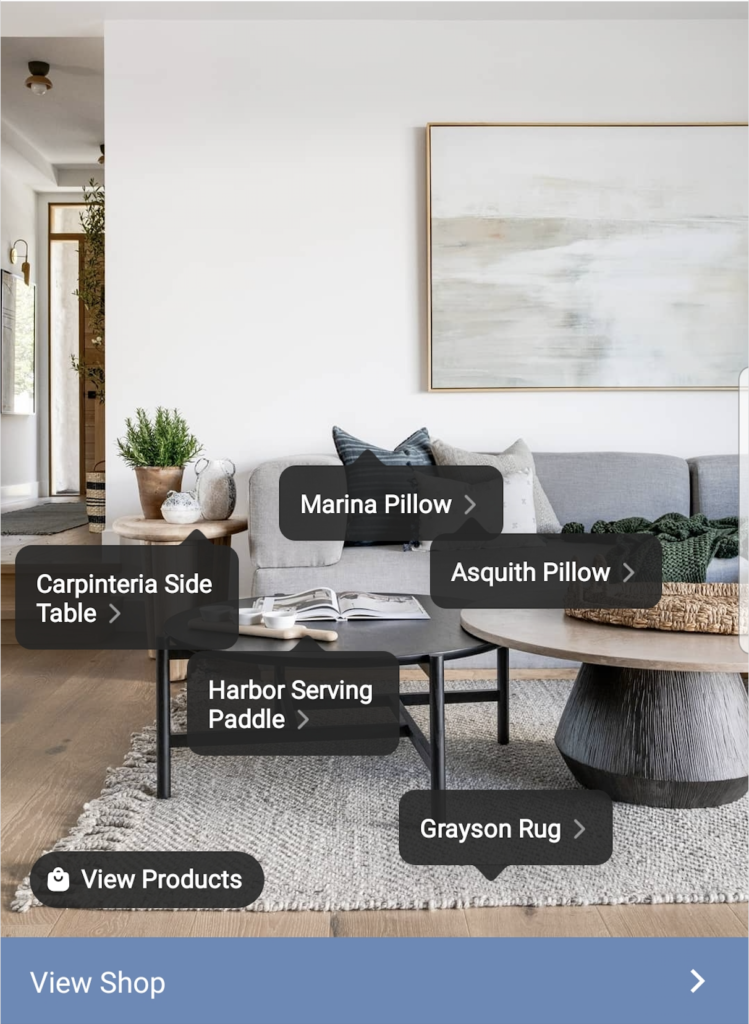
 

instagram shop


Insights for the Last 60 Days

IG insights in-app previously only gave you the last 7 days in the overview section. But now there is 60 days of data in the overview section and they'll be expanding this to 90 days in the coming months. On top of this, stories archives seems to have also been extended from 14 days to up to 2 years old.

Instagram Video Ads up to an Hour Long

Instagram is now allowing video ads up to an hour length for Feed, Stories, and Explore placement. While an hour-long video ad won’t be that appealing, this does at least mean you can use video ads longer than 2 minutes (the previous limitation). This will also allow you to include your Facebook video ads (that are longer than 2 minutes) in Instagram placements for more exposure.

Added Alt Text Feature

Instagram has introduced a new option of adding alt text to images. Not only does adding alt texts to website images help to better SEO ranking, it also means people with visual impairments can enjoy the social media platform more.

Stickers to replace ‘swipe-up’ links on Instagram

Instagram has just removed (end of August 2021) the ‘swipe up’ link in Instagram Stories in favour of a ‘link sticker.’ This link sticker will behave much like the poll, question and location stickers in that creators will be able to resize it, select different styles and place it anywhere in their stories. Ultimately this will enable greater engagement between audiences and creators.
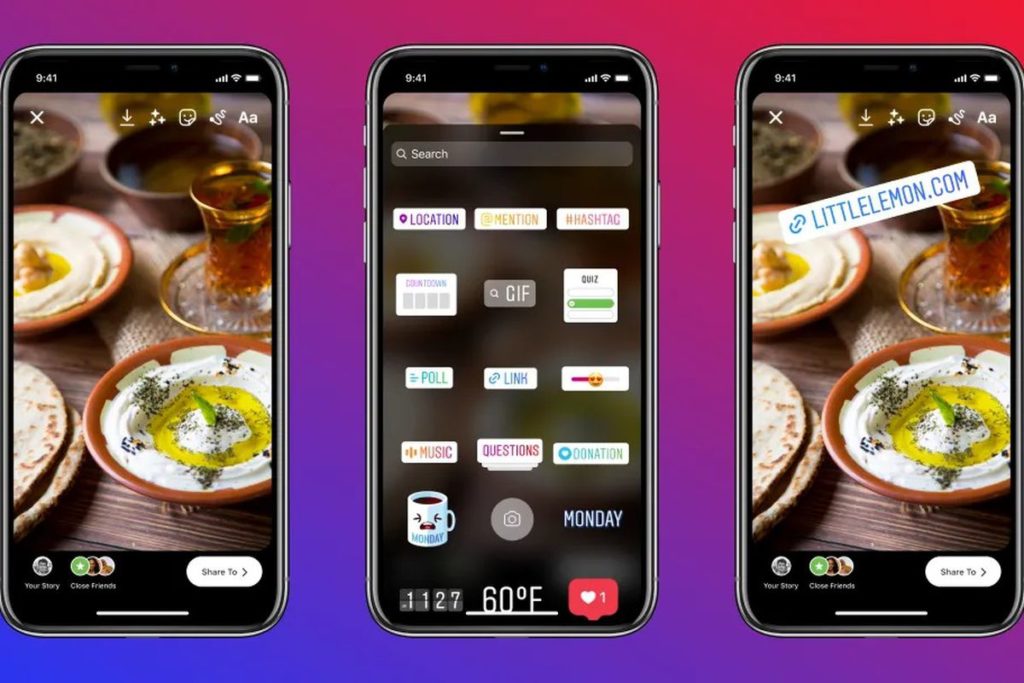
 

Instagram stickers

Turn on Your 2-Factor Authentication Now!

If I could only share one single tip with marketers and business owners around the world, it would be to enable 2 factor-authentication across your most important accounts, right now. I have heard so many stories of Facebook Page’s being lost because someone was able to hack into an Admin’s email.

Why is 2-Factor Authentication so important?

It’s far easier than you think for someone to steal your password. Common actions like using the same password on more than one site, downloading software from the internet, or even clicking on links in emails can put you at risk of having your password stolen. There are a variety of harmful things a hacker can do once they gain access to your account. First and foremost they will lock you out of your own account. By having the 2 factor authentication in place means hackers can’t get into your account, even if they have the password.

How It works

If you set up two-factor authentication, you'll be asked to enter a special login code or confirm your login attempt each time someone tries accessing Facebook or Google from a browser or mobile device isn’t recognised. This login code will be sent to your phone via text, voice call or through the sites mobile app. You can also enable either Facebook or Google to send you alerts when someone tries logging in from a browser or mobile device that the site doesn’t recognise.

There are slight differences in the way each website’s 2-factor authentication works. It's best to follow these links and the instructions they give when setting them up.

For Google Accounts

For Facebook Accounts

Don’t lose control of your Facebook page that you have worked so hard to build. Make everyone who is an Admin on your Facebook page use 2-Factor authentication. It takes less than a minute, do it today.


Why Your Business Should Be Using Instagram Reels

Instagram Reels Logo


The age of social media has meant that attention spans have been dwindling. To market effectively, it's becoming more and more crucial to do so in a concise yet entertaining manner. Instagram Reels is fast becoming a popular marketing tactic to convey messages in an easily digestible, fun way.

What is Instagram Reels?

Reels was developed by Instagram as a direct reaction to the popular Tik Tok platform that gained huge momentum during 2020. Instagram realised they needed a new feature to gain back some of the market share it had lost to Tik Tok.

Reels’ design is very similar to that of Tik Tok; bite-size video clips (15, 30 or 60 seconds) which can be edited with text, filters, stickers and music.

Unlike Instagram stories which are temporary photos or videos that expire after 24 hours, and IGTV long-form videos, Instagram Reels are short-form videos that can live on your profile indefinitely. The casual format of Reels and the editing features within the Instagram app makes it much more feasible to create clips which don’t require high-end production. Reels offer a place to share informal, behind the scenes glimpses into you and your brand. The feature can be a very useful tool to a business wanting to share information in an engaging way.

Instagram Reels is Currently the Favourite Child

At Facebook’s Q2 earnings call in July 2021, CEO Mark Zuckerberg said that Reels is the largest contributor to engagement growth on Instagram.  Facebook, which owns Instagram, will be doing all it can to promote the new feature among its users. Uploading a Reel to your account will likely mean that it will get pushed to the Explore page of your followers. This will reach more of an audience than a normal Instagram feed post would. In order to maximise your reach and exposure, utilising Reels is definitely something to try given its current status as the favourite child.

Improved Engagement on Reels, is this the case? 

Engagements such as views, comments, likes and reshares are important in order for your post to rank in the feeds of Instagram users. Many companies have seen their engagement skyrocket since switching to Reels - although it is not as straightforward as uploading a reel and forgetting about it. Improving engagement on Instagram through Reels can be done, however it requires careful care and attention. The Instagram algorithm will give your Reel more exposure but it's your job to create relevant, engaging content. The more likes/comments/shares you receive on a reel, the more Instagram will increase the reach of your Reel which means more eyeballs on it. It eventually becomes a self-perpetuating cycle. Its also important to try and cultivate conversation on your reels. This can primarily be done by responding to comments on your Instagram Reels, or at the very least ‘hearting’ them.

Instagram Reels are currently one of the hottest topics in the world of digital marketing. This is party due to the fact that Instagram has been pedal-to-the-metal since releasing the feature. In a bid to compete with Tik Tok they’re doing everything in their power to promote the feature. This plays into the hands of any digital marketer. Through careful attention to the content you create, using Reels is currently the best tool you have to increase your organic, free reach.


What is the Facebook Pixel?

Are You Considering Advertising on Facebook?

Then you need to know about the Facebook Pixel

If you’re using Facebook ads or you plan to use them in the future - this is the one key tool you should start using right away.

The Facebook pixel is code that you place on your website that helps you measure the effectiveness of your Facebook marketing campaigns by understanding what users do on your site. The Facebook tracking pixel data helps ensure your ads are seen by the people who are most likely to take your desired action.

The Facebook Pixel is generated within your Facebook Ads Manager account. The default pixel will help you in three main areas:

  • Conversion Tracking: identifies conversions to Facebook traffic (e.g. conversions could be a download of a PDF, a video watched, email link clicked or a sale on ecommerce website).
  • Optimisation: After installation, you can set up automatic bidding to target people who are more likely to convert.
  • Remarketing: Create custom audiences based on groups of users who came from certain ads or, for example, added a product to the cart but didn’t purchase or those that watched a video. Then you can show your ads to such audiences. It also gives you the option to create lookalike audiences

Facebook Pixel - Option to Create Lookalike Audiences

Facebook can use its targeting data to help you build a lookalike audience of people who have similar likes, interests, and demographics to people who are already interacting with your website. This can help expand your potential customer base.

Even if you’re not using Facebook ads yet, you should install the Facebook pixel now. It will start collecting data right away so that you don’t have to start from scratch when you’re ready to create your first Facebook ad.

You Can Use the Facebook Pixel to Collect Data on an "Event"

An “event” is simply a specified action that a visitor takes on your website, like making a purchase. Facebook has 17 predefined standard events and can be used to log conversions, optimise for conversions and build audiences

  1. Facebook has predefined a set of 17 standard events.
  2. You can set up custom events yourself.

Facebook Pixel Standard Events

The standard Facebook pixel events for which you can simply copy and paste standard Facebook event code are:

Website action Description Standard event code
Add payment info Customer payment information during a checkout process. For example, a person clicks on a button to save their billing information. fbq('track', 'AddPaymentInfo');
Add to cart The addition of an item to a shopping cart or basket. For example, clicking an Add to Cart button on a website. fbq('track', 'AddToCart');
Add to wishlist The addition of items to a wishlist. For example, clicking an Add to Wishlist button on a website. fbq('track', 'AddToWishlist');
Complete registration A form completed by a customer in exchange for a service provided by your business. For example, signing up for an email subscription. fbq('track', 'CompleteRegistration');
Contact A telephone, SMS, email, chat or other type of contact between a customer and your business. fbq('track', 'Contact');
Customise product The customisation of products through a configuration tool or other application your business owns. fbq('track', 'CustomizeProduct');
Donate The donation of funds to your organisation or cause. fbq('track', 'Donate');
Find location When a person finds one of your locations via web, with an intention to visit. For example, searching for a product and finding it at one of your local stores. fbq('track', 'FindLocation');
Initiate checkout The start of a checkout process. For example, clicking a Checkout button. fbq('track', 'InitiateCheckout');
Lead A submission of information by a customer with the understanding that they may be contacted at a later date by your business. For example, submitting a form or signing up for a trial. fbq('track', 'Lead');
Purchase The completion of a purchase, usually signified by receiving order or purchase confirmation, or a transaction receipt. For example, landing on a Thank You or confirmation page. fbq('track', 'Purchase', {value: 0.00, currency: 'USD'});
Schedule The booking of an appointment to visit one of your locations. fbq('track', 'Schedule');
Search A search performed on your website, app or other property. For example, product or travel searches. fbq('track', 'Search');
Start trial The start of a free trial of a product or service you offer. For example, trial subscription. fbq('track', 'StartTrial', {value: '0.00', currency: 'USD', predicted_ltv: '0.00'});
Submit application The submission of an application for a product, service or program you offer. For example, a credit card, educational program or job. fbq('track', 'SubmitApplication');
Subscribe The start of a paid subscription for a product or service you offer. fbq('track', 'Subscribe', {value: '0.00', currency: 'USD', predicted_ltv: '0.00'});
View content A visit to a web page you care about. For example, a product or landing page. View content tells you if someone visits a web page's URL, but not what they do or see on that web page. fbq('track', 'ViewContent’);

Facebook Pixel Custom Events

You can use custom events in place of standard events, or to collect more details than Facebook pixel standard events can provide.

For instant, you could use Facebook pixel tracking to record views of a specific category on your website, instead of tracking all views. Perhaps you want to separate kitchen renovation interest from bathroom repairs based on which sections of your building company's website they viewed. Or you could filter all purchases to measure just those of women’s shoes over $40.

Custom events use URL rules based on specific URLS or URL keywords - this extra code is called parameters.

These allow you to customise the standard events based on:

  • How much a conversion event is worth
  • Currency
  • Content type, or ID
  • Basket contents

You can learn more about custom conversions in this Facebook help article.


Your Facebook Organic Page Reach is Declining

How Does the Facebook Algorithm Work?

Each user’s News Feed is like the front page of a personalised newspaper. It includes recent popular updates both from their personal Facebook friends and from the businesses they follow.

If Facebook displayed every single update, users would be overwhelmed by the mountain of content. Instead, Facebook uses an algorithm to predict what each user will find most interesting. In other words, the more popular the content is, the more likely your fans will see it.

The algorithm’s job is to determine how much power a particular post has.
The number-one factor is engagement. If the algorithm sees lots of people engaging with your post, then the algorithm shows the post to more people.

Your post gets some initial reach in the first few seconds. Maybe 1% of your fans or friends see it. If that engagement is high, more people will see the post.

The number-two factor is the content. If other people are interested in the content of your post, it gets a bit of a bump. This includes:

  • The number of people interacting with the post
  • The number of reactions, comments, and shares
  • Posts coming from friends or family

Engagements also have relative power. An example of relative power is when a story appears in your News Feed because one of your friends liked, shared, or commented on it.

Low Engagement with a User

The Facebook algorithm gives credit to Pages who have received feedback from a particular user (posts, comments, likes, tags, and shares).  So, if a user consistently interacts with a page, more page posts are likely to show up on that user’s page.  However, if a user rarely interacts with a page, the opposite is true, and page posts tend to be rarely seen by a particular user. Therefore, a Fan may be reading, even enjoying, your page posts, but unless they engage with you, your posts will not end up in their News Feed.

That’s why your job is not only to post content regularly, but figure out what kinds of updates will get your fans to do something. The more you can inspire your fans to click 'Like' on your updates, to leave comments, or to click 'Share' to spread your words to their friends, the better your 'reach' numbers will be.

Then it becomes a cycle; you post content that gets 'Likes' and comments, appears in News Feeds, increasing the chance of more Interactions.

Tactics to Mitigate the Facebook Algorithm

Here are some tactics to help with your organic reach:

  • Ask questions in your post - aim for closed-ended questions, those with a yes/no true/false type answer so your audience doesn't have to think too hard
  • After you post, like your post
  • If you have another Facebook page, share your post to this page, if appropriate.
  • Respond to every single comment, preferably with ANOTHER question for the commenter to make them comment again.
  • When you respond to comment, tag the person in it for extra notification on their homepage.
  • Click 'like' on every comment, even your own.
  • Post when your fans are online (your Facebook Insights will show you this)
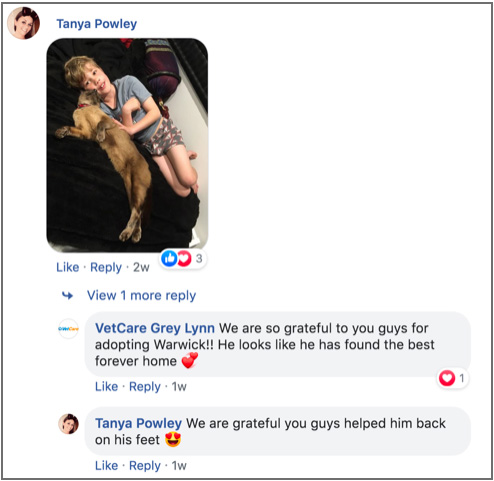
Reply comments Facebook Cre8ive Marketing
Example of the Business Page Admin replying to a customer which has lead to the customer replying to this comment.

Essentially you want to make it appear there’s a ton of 'activity' happening on your post, and Facebook will reward your efforts with more organic reach, in other words, increased reach into people’s News Feed.

BONUS - if you achieve a good organic reach for a post, it will impact positively on the next post. On the other hand, a post with low engagement will negatively impact the subsequent post. That is why you are better to have one dynamite posts than many low-engaging posts.

Content that your Fans Love

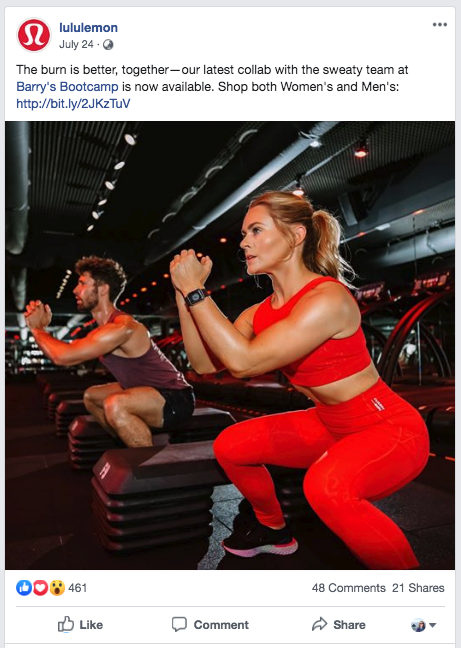
There’s no substitute for content that is of value to your fans to increase your reach and engagement. Stop posting content that you think is important and instead focus on what your Fans want to see. Although Facebook's algorithm is skewed to show more posts from friends than business pages, you can still get around it with good content. Here is an example from Lululemon who consistently post informative, interesting posts for their fans.

Cre8ive Dunedin Facebook Post content fans love

Show Your Human Side

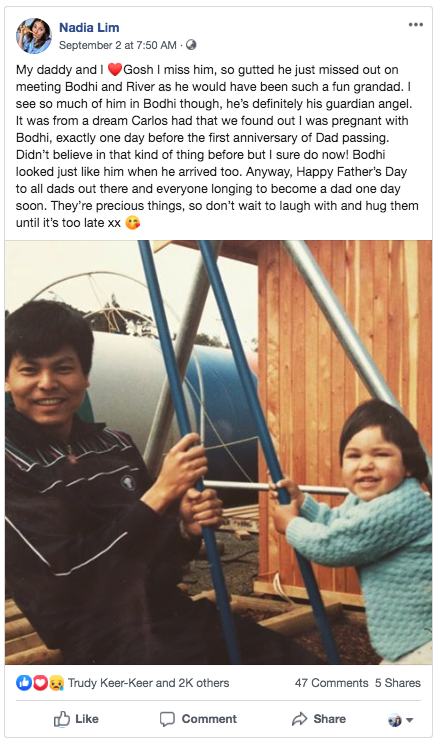
People don’t do business with businesses - they do business with people. Make sure you profile your staff, customers and other personal sides to you and your organisation. Take this example that Nadia Lim, the New Zealand celebrity chef, entrepreneur, food writer and television personality posted on her Facebook Page to celebrate Father’s Day that gained excellent traction with engagement levels.
Cre8ive Dunedin Facebook Post engagement Tips Algorithm
If you employ these tactics in your overall Facebook strategy, your Page will be in a better position to maximise as much organic reach as possible. And remember, if you have an important message that needs to be seen by your Fans - you need to pay! Facebook is no different to paying for an advert on the radio, TV or newspaper.

Should You Upload Your Video to Facebook or YouTube?

The world’s largest social media marketing resource, Social Media Examiner® helps millions of businesses discover how to best use social media to connect with customers, drive traffic, generate awareness, and increase sales. They offer original and comprehensive articles, expert interviews, original research, and the news businesses need to improve their social media marketing.

They received a variety of feedback from their fan base - some were shocked and disappointed as they don’t view YouTube as a social platform. However, most applauded the move because they don't watch videos on Facebook. Instead, YouTube is their preferred place.

Founder Michael Stelzner likes to use this analogy “it’s kind of like putting a TV show on a highway and expecting people to watch it as they go zipping by. And Facebook is a highway"

The Results

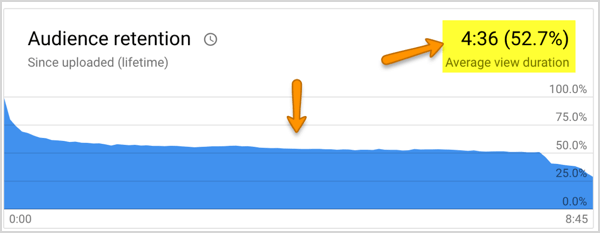
They published the behind-the-scenes documentary called "The Journey" exclusively on YouTube. It's their ongoing story about how they market. Each show is about 7 minutes long and offers a peek into the real struggles and discoveries made by their marketing team.Their results showed that on YouTube, about 50% of the people who watch each episode actually make it to the end. That is exceptional compared to Facebook, which is almost always less than 1% for the exact same content.
The misleading part:
It "looks" like a lot more people are watching on Facebook because the view counts are deceptive. Facebook counts what's really a drive-by impression of 3 seconds as a view. On YouTube, a view is 30 seconds or more (although this has recently been changed to 10 seconds.)If you receive 5000 video views on Facebook and 1% make it to the end, that's 50 people. If you get 1000 views on YouTube and 50% make it to the end, that's 500. That's a 10x improvement and the Social Media Examiner team decided they would rather have 500 people make it to the end, not 50.


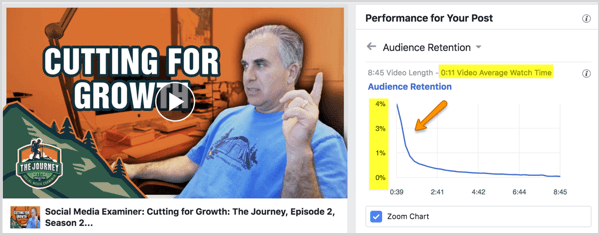
YouTube is where people prefer to watch videos that are longer than a few minutes. Here’s what a typical video’s retention looks like for Social Media Examiner on Facebook:

This pattern they witnessed over and over.

Despite the fact that Social Media Examiner has a significant fan base of 534,000 on Facebook and a small but growing one on YouTube (23,000), the data is clear. It's YouTube for the the long-form video content from now on for them.

Helpful Tips to get Your Organisation ready for GDPR

Have you heard of the European Union’s (EU) new privacy law, the General Data Protection Regulation (GDPR)? It came into effect on 25 May 2018, and is known as “the most important change in data privacy regulation in 20 years”. While it is an EU law, it applies not only to EU-based entities, but also to any organisation worldwide (including those in New Zealand) that have personal data of EU citizens or residents, even if these residents are not living in the EU. The fine is hefty; up to $20 million euros or 4% of annual worldwide turnover (whichever is higher).

Now is a good time to review your marketing strategies that involve collecting, tracking or using your customers’ personal data. While we recommend you consult with a legal and/or privacy professional to understand the full scope of your obligations under the GDPR, here are some tips that might be helpful for fulfilling your compliance obligations.

Firstly, it’s important to understand what is meant by ‘Personal Data’.
Personal data is broadly defined in the GDPR as any information relating to a person who can be identified either directly or indirectly. These can range from from personal details such as name, address, financial, medical and location details to images and voice recordings. Data Guidance provides a comprehensive list of all the forms of personal data included under GDPR.

What are the New GDPR Regulations?

There are multiple changes as to how a business can use personal data from now on. Three major changes that are most likely to affect New Zealand businesses are:
The customer now has to take clear, affirmation action to give consent for the use of their personal information. Inactivity does not constitute as consent.
The business must give a clear, specific explanation to the individual of what data will be collected and what it will be used for.
The data can only be collected for a specified, explicit and legitimate purpose and may not be used for any alternative purposes.

What Action Should You Take as a Business Owner?

Review these processes below to ensure they comply with GDPR requirements.

1. Update Sign Up or Subscriber Forms

Review consent with existing subscribers, and if it contained a pre-ticked box or any other form of non-action gaining of consent, run a “re-permission” email campaign to gain consent that complies with GDPR legislation.
Review your subscription forms for new subscribers and ensure they have to actively consent to the use of their personal information, such as an ‘opt-in’ box.
Ensure you have an easy “opt-out” option for users to withdraw their consent later on.

2. Update your Privacy Policy

Ensure you are transparent and clearly state what personal data you will be collecting and what purpose you will be using it for.
Explicitly state any third-parties that you will share user’s personal data with, such as analytics and payment processes.
Ensure the policy is written in simple language that is easy to understand to the user.
Explain the subscriber’s right to, at any time, submit a ‘User Access Request'. This means providing the user, free of charge, the following information: what personal information is being processed, why this information is being processed, who has access to it and how this information is being used.

3. Notify Existing Customers

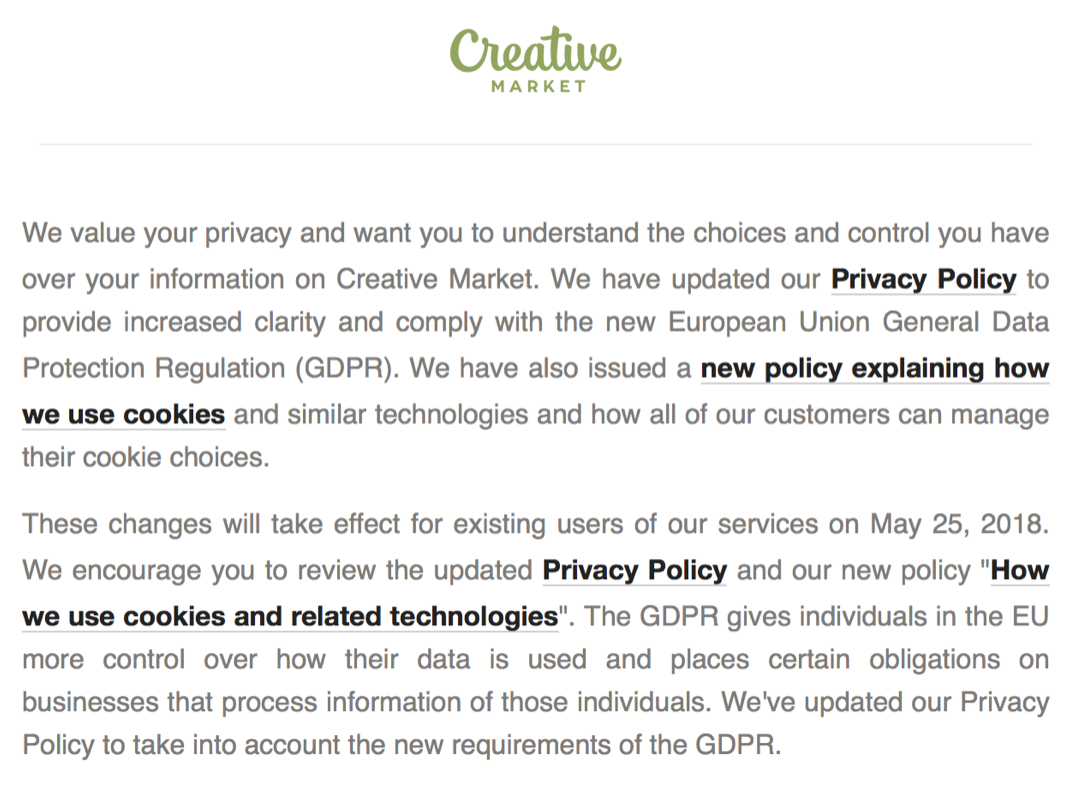
Once you have updated your Privacy Policy, make sure you notify existing customers. See Creative Market’s email as an example:

How Will GDPR Affect Your Social Media Marketing Strategy

The posting of content and engaging fans will not be affected majorly by the new regulations, because it does not usually collect personal data from users who view or engage with it. However, there are still two things you should avoid doing:

  • Exporting or saving the contact details of your followers
    If you are sending traffic from your social media account to your website and using Google Analytics to analyse this, you will need consent to track visitor behaviour
  • Social advertising (or paid social media marketing) is a different story.

If you are running social media ads, and wish to use your customers’ data or track their behaviour, you must gain their legal consent to do so. This means having clear ‘opt-in’ option, which the customer must actively consent to. While most of this will be covered in the terms and conditions and privacy notices of the majority of social media platforms, it would be wise to check this and ensure you are gaining consent through their policies.

If you are using lead form ads, such as on Facebook, you will need to state what you are using the data for, how it will be processed and gain explicit consent again from the user. Facebook now allows you to add a custom disclaimer to your page, which you can use to include all the additional necessary information to comply with GDPR.


Breaking News From Facebook – the End of the Newsfeed as We Know It

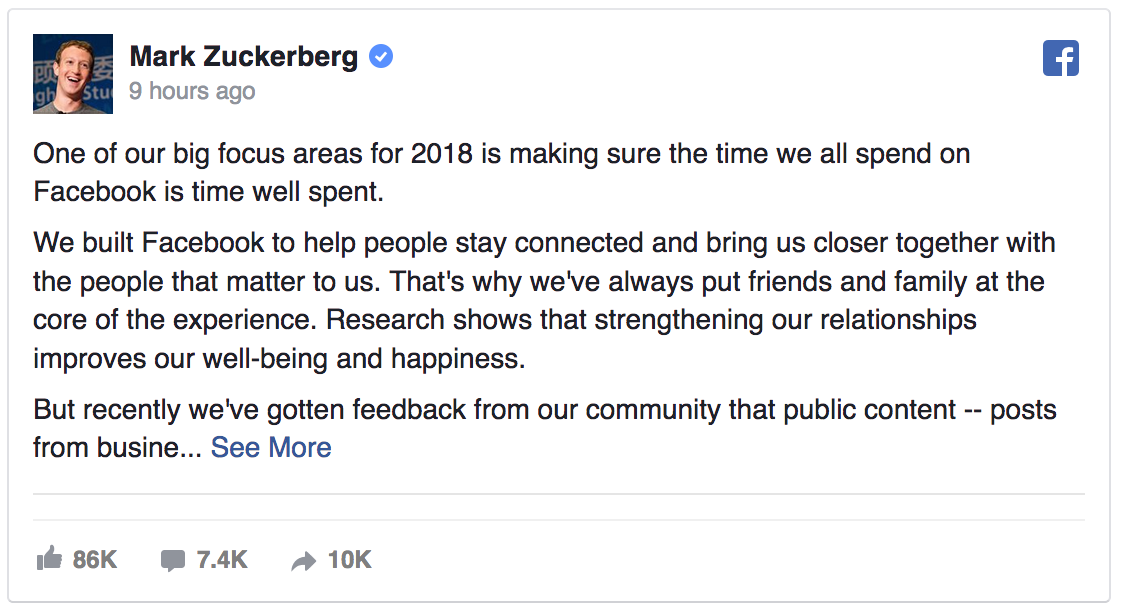
Mark Zuckerberg announced on the 11 January 2018 that significant changes to the Newsfeed are about to be implemented over the next few weeks. The focus being on posts from friends and family shown over businesses and publishers: "..prioritize posts that spark conversations and meaningful interactions between people."  The key here being people and no mention of organisations.

As for the future of the Facebook Newsfeed, Zuckerberg states users will see "less public content, including videos and other posts from publishers or businesses." See Mark's Facebook post below revealing this latest, significant update that will impact ALL businesses and organisations who use Facebook as a marketing tool to reach fans.

Mark Zuckerberg announces the end of the newsfeed for businesses as we know it

Due to the declining space availability in the Newsfeed, Facebook states that it wants to focus on "showing more posts from friends and family and updates that spark conversation means we’ll show less public content, including videos and other posts from publishers or businesses."

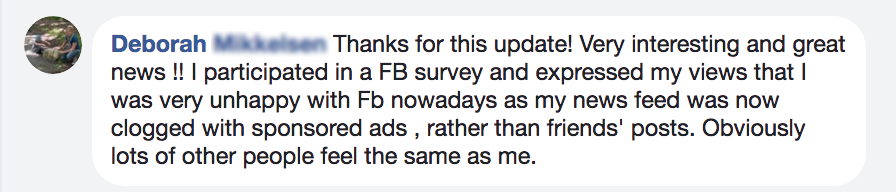
Interestingly, when I shared this article on my personal Facebook page a friend commented how relieved she was that "Facebook listened" about how she was sick of seeing "sponsored ads" in her newsfeed. Many like her will be thinking the same -  they don't realise that it's the organic reach that Facebook is severely cutting back on. They certainly aren't reducing paid advertising. Now, more than ever, Facebook is a "pay to play" platform.
facebook announcement zero organic reach

What Will Be the Impact on Business Facebook Pages?

This latest announcement has caused a huge stir in the social media marketing world. And so it should.  ALL Pages will notice a significant drop in organic reach as Facebook clearly states "As we make these updates, Pages may see their reach, video watch time and referral traffic decrease."

We have seen a declining organic reach for the past few years, with reach dropping from about 16% to 2% with speculation rife that it would drop even further, potentially to 0%.

Develop New Strategies

Let's be 100% clear about this annoucement - Facebook is effectively deprioritising business' posts. There are some who say it won't matter as much as the hype leads us to believe - we just need to "post relevant content and generate meaningful conversations" However, most businesses don't actually understand what this means and have been getting it wrong for awhile now. It's absolutely critical for businesses and organisations to develop a Facebook strategy that covers how to get around the algorithm - and that businesses will have to 'pay to play.'

Your emphasis must absolutely now be on posting highly relevant, entertaining content that appeals to your target market and definitely do not use 'engagement-baiting' techniques. Any posts that have a 'passive experience' in other words, no interaction from Fans, will definitely lead to no organic reach and will impact negatively on future posts. Properly understanding how the Newsfeed and algorithm works is vital. According to leading Social Media Expert, Micheal Stelzner part of this update will affect the strategy of linking to your blog from Facebook "The days of traffic from the Newsfeed to blog posts are dead."

If you have engaged a social media company or individual to manage your Facebook Page, and, if they haven't been in touch, make sure you initiate a meeting to discuss a revised strategy for your Page. Don't have a social media company? We offer consultancy, private training or you can attend a Facebook Group Training Session coming up in February 2018 in Dunedin.

If you want further information or advice on what to do for your Facebook Page, you can email philippa@cre8ive.co.nz

Please Share
cre8ive-facebook Cre8ive-Twitter

Avoid Getting Your Instagram Account Banned or Hacked

Instagram has developed into a leading social media tool for brands and there’s one feature that most would like to be able to do - schedule photos that auto post to Instagram! Even though this feature would lessen the headaches for social media managers - did you realise that if you find such a tool, using it puts your Instagram account at risk of getting banned or hacked?

Earlier in July there seems to have been an Instagram bug that make users accounts appear to be deleted. So, how can you keep your Instagram account safe?

Simply put, don't violate Instagram's terms of use which includes using apps that automatically post to Instagram for you.

Here’s a list of things you can’t do:

  • No Auto Posting to Instagram: “You shall not use the Instagram APIs to post automated content to Instagram, including likes and comments that were not initiated and entered by an Instagram user.”
  • No Instagram Bots: “Don’t participate in any “like,” “share,” “comment,” or “follower” exchange programs”
  • No Hacked API: “Don’t reverse engineer the Instagram APIs or any of Instagram’s apps” and “You must not access Instagram’s private API by means other than those permitted by Instagram”

Also, you should also avoid any software, websites, or apps that ask you to “log in” with your Instagram account on their own page, instead of Instagram’s secure login page.

Safe Instagram schedulers like Later, Hootsuite, Planoly and Buffer can’t see your private Instagram messages, they can’t post to Instagram for you, and they don’t know your Instagram password.

Please Share
cre8ive-facebook Cre8ive-Twitter