Master the Instagram Reels’ Algorithm in 2025: 11 Proven Tips for More Reach

Instagram Reels remains one of the most powerful tools for organic reach in 2025. By crafting Reels that captivate and convert, your brand can gain visibility, grow followers and drive meaningful engagement all without paid ads.

But knowing what to post is only half the battle. To truly harness Reels, you need to understand the algorithm’s preferences and adapt your content accordingly. Use the following refined strategies to transform your Reels into reach-generating machines.

How the Instagram Reels' Algorithm Works in 2025

The Instagram Reels algorithm is designed to serve content that keeps users watching, engaging and spending more time on the platform. It analyses factors like:

  • Watch time (especially full views and replays)
  • Engagement signals (likes, saves, shares, comments and DMs)
  • Content relevance (niche consistency and topic relevance)
  • Video quality (high resolution, originality and no watermarks)
  • Audio trends (using popular or original sounds)
  • Posting behaviour (consistency, timing and frequency)

The algorithm rewards creators who consistently hold viewer attention and drive meaningful interactions.

11 Tips to Hack Instagram’s Reels' Algorithm in 2025

1. Keep Reels Under 90 Seconds

Short-form video continues to dominate. While Instagram allows longer Reels, the algorithm still prioritises videos that are quick, engaging and watched in full.

Pro tip: Seamless loops can significantly increase total watch time. Craft endings that naturally flow back to the start to encourage replays.

2. Hook Viewers in the First 3 Seconds

First impressions are everything. The algorithm heavily weighs early engagement and retention. If viewers scroll past before the three-second mark, the algorithm assumes the content is not engaging.

You can start your reel with:

  • A bold statement
  • A quick problem-solution hook
  • A surprising or visually intriguing clip
  • A question that captures curiosity instantly

3. Use Original, High-Quality Content

Instagram prioritises fresh, original content. Reposting from TikTok or other platforms, especially with watermarks, will limit your reach. High-resolution, clean footage is essential.

Filming tip: Use Instagram’s in-app camera when possible or edit externally with no watermark to maintain video quality.

4. Add On-Screen Text and Captions

Most people watch Reels on mute, so adding captions is not just an accessibility feature – it is a strategy that directly boosts engagement.

Best practices:

  • Use clear, easy-to-read fonts
  • Show key messages within the first five seconds
  • Highlight important words or phrases to improve clarity

5. Leverage Trending or Original Audio

Audio remains a major ranking factor. Using trending sounds helps Instagram push your content to users engaging with that trend.

Even better, create your own sounds. If others start using your original audio, your Reel continues gaining traction long after posting.

Where to spot trending audio:

  • Browse the Reels tab
  • Look for arrows next to audio tracks, which indicate trending sounds
  • Check TikTok trends, as Instagram trends often follow shortly after
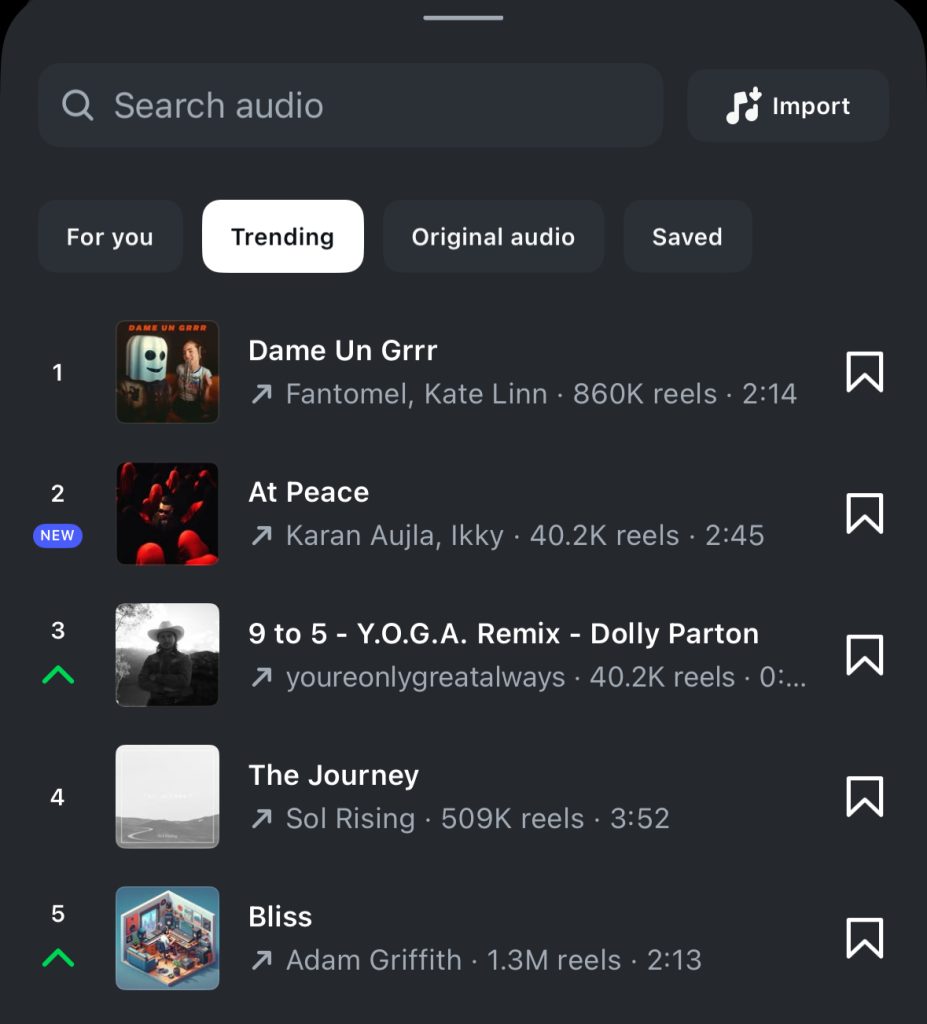
How to find trending audios on Instagram
Trending audio tab on Instagram Reels

6. Encourage Meaningful Engagement

Saves, shares (especially through DMs) and comments are far more influential than likes.

Boost engagement by:

  • Asking questions in captions
  • Using strong calls-to-action like “Save this for later” or “Tag someone who needs this”
  • Creating valuable, relatable or thought-provoking content that sparks discussion

7. Post When Your Audience is Most Active

Posting when your audience is online increases the chance of immediate engagement, which sends positive signals to the algorithm.

How to check:

  • Open Instagram Insights
  • Go to ‘Audience’ and review ‘Most Active Times’

Test different time slots, such as mornings, lunch breaks or evenings, to see what works best for your followers.

8. Stick to a Niche and Consistent Style

The algorithm needs clarity about what your content is about. If your content is scattered across too many unrelated topics, it becomes harder for Instagram to recommend it to the right audience.

Be consistent with:

  • Your niche (for example, fitness tips, sustainable living, small business marketing)
  • Aesthetic (filters, fonts, colour palette)
  • Tone of voice (educational, entertaining, inspiring or conversational)

This consistency also supports Instagram SEO, helping the algorithm categorise and surface your content more accurately.

9. Optimise Hashtags and Captions for Search

Instagram has evolved into a powerful search engine. Users now search using keywords, not just hashtags.

Optimise by:

  • Using three to five relevant hashtags. Overloading with more no longer improves reach.
  • Writing captions that naturally include keywords your target audience searches for. For instance, if you are a wedding photographer, phrases like “Dunedin wedding photographer” or “how to pose for wedding photos” help your Reel show up in relevant searches.

Bonus tip: Your Instagram bio, username and captions all contribute to how you rank in search results.

10. Share Reels in Stories for Extra Reach

Extend the lifespan of your Reels by resharing them to your Stories. This drives additional traffic from followers who may have missed the Reel in their feed.

Tip: Share the Reel to your Stories two to three days after posting. This gives the post a second wave of visibility.

For extra interaction, add poll stickers, question boxes or countdowns to encourage viewers to engage with your Story.

11. Use Built-In Reels Templates

Instagram’s built-in templates are more than just a convenience. They are designed around formats that are already performing well within the algorithm.

How to use them:

  • Open the Reels tab and tap ‘Templates’
  • Choose a template that fits your style, such as before-and-after transitions, quick-cut edits or storytelling sequences

Using these not only speeds up production but also aligns with current algorithm preferences.
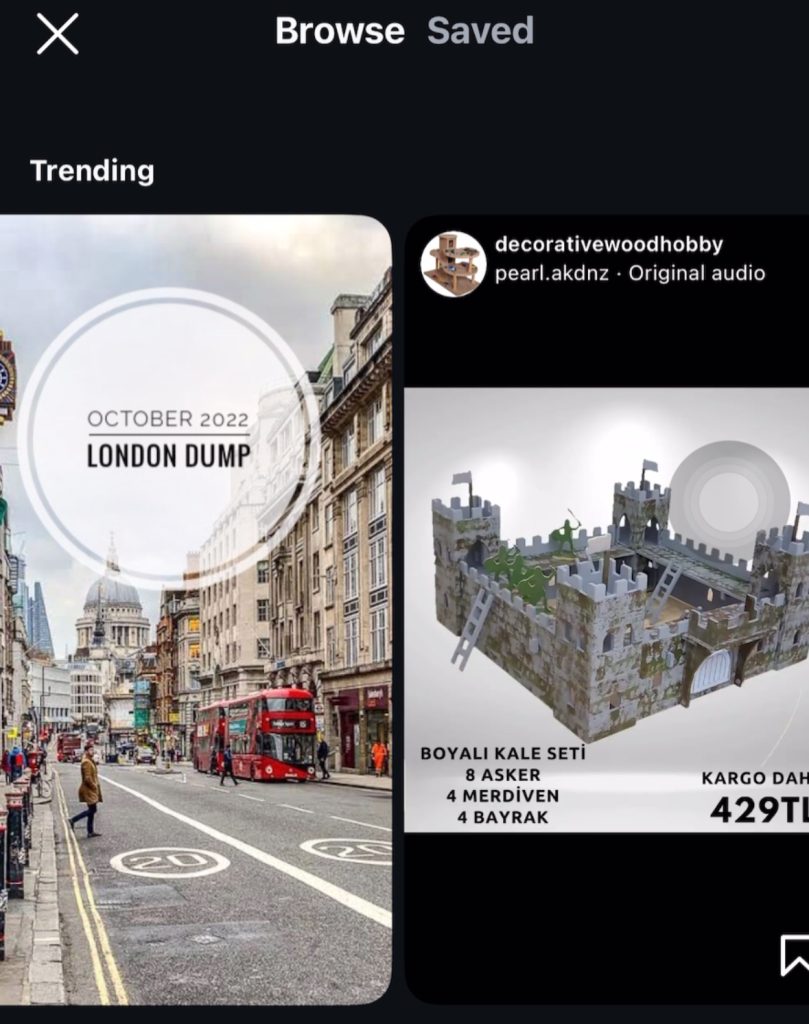
Instagram trending reels templates
Trending Instagram Reels templates

How to Put These Strategies into Action

If you want to maximise your Instagram Reels performance, here is a quick action plan:

  • Plan strong hooks that grab attention within three seconds
  • Film directly in the app to maintain quality and avoid watermark penalties
  • Add captions and on-screen text early in your Reel
  • Monitor audio trends within the Reels tab and consider creating your own sounds
  • Prompt meaningful engagement by responding to comments and including calls-to-action
  • Use Instagram Insights to track which Reels perform best in terms of saves, shares and views, then repeat those formats

There is no secret trick to hacking the Instagram Reels algorithm — but there is a clear formula. Focus on delivering value, maintaining consistency and creating high-quality content that speaks directly to your audience.

The creators and brands succeeding in 2025 are those who adapt quickly, lean into trends while maintaining authenticity and understand the signals the algorithm cares about.

Start applying these strategies today, and you will turn your Reels into powerful tools for organic growth, reach and community building.



The Rule of 7: Lessons from 1930s Hollywood On How to Leverage Your Social Media

On How to Leverage Your Social Media Channels

It is very difficult to stand out among the thousands of brands vying for customers’ attention. But a tactic that has stood the test of time is the “Rule of 7”.

From 1930s Hollywood to Modern Marketing: The Timeless Power of the Rule of 7 

The Rule of 7 marketing principle, which suggests that a customer needs to see or hear a marketing message at least seven times before making a purchase decision, originated in 1930s Hollywood. It was developed by film industry executives who discovered that moviegoers needed to see a promotional message, such as a poster or advertisement, at least seven times before deciding to watch a film. This concept has since been adapted across various industries and remains a cornerstone of marketing strategies to increase brand awareness and conversion rates​

The principle is rooted in the psychological concept of the "mere-exposure effect", which explains that repeated exposure to a stimulus tends to foster familiarity and trust, making people more likely to engage with it​.

Over the decades, the Rule of 7 has been widely embraced, evolving to include digital marketing touchpoints like social media, email and video, demonstrating its adaptability to modern consumer behaviours​.

Why the Rule of 7 is Still Valid Today for Digital Marketing

In today’s digital age, the Rule of 7 is even more critical. With consumers constantly bombarded by information from all directions - online and offline - it’s easy for messages to get lost in the noise. 

Having a marketing strategy that leverages multiple touchpoints can significantly improve your chances of being heard.

In fact, some say that in today's crowded marketplace, it may take more than seven exposures before customers even notice your brand, let alone consider buying from you. That’s where social media comes in as a powerful tool to amplify your messaging.

Social Media marketing

Applying the Rule of 7 Nowadays: How Social Media Amplifies Brand Visibility

Social media is one of the most effective ways to implement the Rule of 7. Unlike traditional advertising, social media offers the opportunity for frequent, personalised and interactive engagement with your target audience.

1. Organic Social Media Posts

Your daily or weekly posts on platforms like Instagram, Facebook, LinkedIn or X (formerly Twitter) are the core of your social media strategy. Share value-driven content such as industry tips, how-to guides, product features or customer testimonials. Each post reinforces your brand and gives followers a reason to keep coming back.

2. Targeted Ads

You can create multiple touchpoints by showing ads to specific segments of your audience. These ads can be single images, carousels or short-form videos, offering flexibility and visual variety. Whether it’s retargeting website visitors or engaging people who’ve interacted with your brand before, paid ads can hit your audience with the right message at the right time, multiple times.

3. Instagram and Facebook Stories

Stories is a less formal option to stay connected with your audience. These short-lived posts allow you to share behind-the-scenes content, quick updates or product teasers that pop up frequently in users’ feeds, providing an informal but effective touchpoint.

4. Email Newsletters

Sharing your latest blog posts, company updates or exclusive offers via email can act as another vital touchpoint. Combining email marketing with social media reinforces your message and ensures you’re connecting across multiple channels. Your email database is a critical tool in your marketing toolbox as it is one of the assets you actually own and have full control over. 

5. Social Media Collaborations

Partnering with other brands or companies can introduce your offerings to a new audience. It serves as a strong, trust-based touchpoint for their followers, helping to expand your reach.

6. Interactive Content

Engage your audience with interactive posts like polls, quizzes, or Q&As. These not only serve as fun, engaging touchpoints but also provide valuable insights into their preferences and opinions, showing them that you genuinely care about their thoughts.

7. User-Generated Content (UGC)

Encourage your customers to create content about your product and share it on their social platforms. When others post reviews, photos or videos using your brand, it serves as a trusted third-party endorsement. Reposting this content adds authenticity to your touchpoints and deepens customer engagement.

Four Practical Tips to Maximise the Rule of 7

While you don’t need to follow these exact seven touchpoints, the key is finding the right mix that works for your brand and audience.  To maximise the impact of the Rule of 7, here are four tips to help you stay top of mind:

  • Post Consistently

    Regular posting is key to staying visible. Share content that resonates with your audience regularly - whether it’s daily updates or weekly posts - to ensure you're maintaining steady engagement without overwhelming them.

  • Use Paid Ads

    Boost your reach by using paid advertising to target specific audience segments. Retargeting ads can keep your brand in front of those who’ve already shown interest, helping to create those essential multiple touchpoints.

  • Engage Directly

    Responding to comments, messages or questions builds a personal connection with your audience. Each interaction strengthens brand familiarity.

  • Diversify Your Content

    Keep your content fresh by mixing it up. Use blog posts, videos, stories, and infographics to appeal to various preferences, creating different ways for your audience to interact with your brand.

While social media offers powerful ways to implement the Rule of 7, traditional marketing channels like print ads, TV, radio and direct mail still play an important role. 

Combining both digital and traditional methods creates a well-rounded strategy, ensuring your brand reaches prospects across multiple touchpoints and environments and further increasing your chances of making a lasting impression.


Mastering the Facebook Algorithm: Strategic Approaches to Maximise Organic Reach in 2025

In today's digital landscape, achieving meaningful organic reach on Facebook requires more than just posting regularly — it demands a strategic approach that aligns with the platform's ever-evolving algorithm.

The Algorithm Evolution: From Followers to Recommendation-Based Feed

Facebook has undergone a significant algorithmic transformation, shifting away from its traditional focus on connecting users primarily with content from pages and people they follow. Instead, it now embraces a recommendation-based model similar to TikTok's "For You" page approach, which prioritises content based on relevance and engagement potential regardless of connection status.

This fundamental change means businesses no longer need to focus exclusively on building follower counts. The new algorithm presents an exciting opportunity to reach audiences far beyond your existing followers. If your content resonates strongly enough, Facebook will distribute it to users who have never encountered your brand before but share interests that match your content.

This recommendation-based approach rewards content that generates genuine interest and meaningful engagement over content that checks the box of regular posting to an established audience. At Cre8ive, we've adapted our strategies to leverage this algorithm shift, helping your content appear on News Feeds and genuinely connect with existing and entirely new audiences.

Strategic Timing Makes All the Difference

The "when" matters just as much as the "what" when it comes to Facebook success:

  • Audience Activity Windows: Leverage Facebook Insights to identify exactly when your specific audience is most engaged and schedule your most important content accordingly.
  • Strategic Spacing: Maintain a 48-72 hour buffer between significant posts to prevent them from competing with each other for algorithmic attention.
  • Counter-Intuitive Timing: Consider testing posts during slightly off-peak hours—this can sometimes result in higher initial engagement rates as there's less competition in the feed.
  • Consistency Signals: Establish a reliable posting cadence that signals to the algorithm your page is consistently active without overwhelming your audience.

Video Content: Facebook's Algorithmic Favourite

Facebook's algorithm heavily favours video content that keeps users on the platform:

  • Native Uploads: Always upload videos directly to Facebook rather than sharing links from YouTube or other platforms—the algorithm significantly rewards native content.
  • Mobile-Optimised Formats: Create square (1:1) or vertical (9:16) videos that dominate more screen real estate on mobile devices where most Facebook browsing occurs.
  • Accessibility Prioritisation: Include captions on all video content—not only does this make your content more accessible but Facebook specifically prioritises videos that all users can consume.
  • Strategic Duration: While the algorithm rewards longer watch times (3+ minutes), design your videos with the understanding that most users will only watch for 15-30 seconds. Front-load key messages while still creating content that rewards complete viewing.

avoid engagement baiting on social media

Engineering Meaningful Conversations

The algorithm prioritises content that generates authentic interactions:

  • Conversation Design: Craft posts specifically designed to generate meaningful comments and extended discussion, not just quick reactions.
  • Thoughtful Questions: Include specific, open-ended questions that naturally encourage responses beyond simple one-word answers.
  • Conversation Threading: When responding to comments, include follow-up questions that create deeper conversation threads, which signals high-value content to the algorithm.
  • Authentic Engagement: Carefully avoid "engagement bait" phrases like "comment below" or "share if you agree"—Facebook actively penalises these tactics with reduced reach.

Content Variety: Signalling Dimensional Value

Diversification in your content approach demonstrates the versatility to the algorithm:

  • Format Rotation: Regularly alternate between different post formats, including text on coloured backgrounds, single images, carousels, polls and Reels.
  • Cross-Feature Visibility: Use Facebook Stories alongside regular feed posts to increase page visibility and engagement touchpoints.
  • Content Ecosystem: Create interconnected content that references your other posts, encouraging deeper exploration of your page.

Strategic Hashtag Implementation

Unlike Instagram, Facebook requires a more restrained hashtag approach:

  • Quality Over Quantity: Limit usage to 2-3 highly relevant hashtags per post that genuinely connect to search intent.
  • Branded Consistency: Develop and consistently use your branded hashtag (#ENGAGE) to build a recognisable content collection.
  • Relevance Filtering: Avoid generic, oversaturated hashtags that dilute your content's relevance and can actually reduce algorithmic visibility.

The Critical First Hour

The initial engagement period heavily influences a post's long-term reach:

  • Team Coordination: Mobilise team members to authentically engage with new posts within the crucial first 60 minutes after publishing.
  • Strategic Amplification: For particularly important content, consider micro-boosting ($2-5) during the first 24 hours to generate the momentum that triggers organic algorithm amplification.
  • Cross-Platform Promotion: When appropriate, share relevant content across your organisation's ecosystem (such as Cre8ive's main page) to expand initial visibility.
reply to comments and add questions to encourage another comment

Comments: The Currency of Algorithm Value

How you handle comments significantly impacts algorithmic perception:

  • Universal Acknowledgment: At a minimum, like EVERY comment received to acknowledge engagement and signal active page management.
  • Timely Responses: Reply to comments within 24 hours using your consistent brand voice to maintain conversation momentum.
  • Conversation Extension: End responses with open-ended questions that encourage continued dialogue (e.g., "Have you implemented something similar? What results did you see?").
  • Issue Management: Establish clear protocols for addressing negative or concerning comments to maintain positive community signals.

Advanced Algorithm Tactics

Beyond the basics, these additional strategies can further optimise your Facebook presence:

  • Content Segmentation: Use Facebook's organic post-targeting options to deliver specific content to relevant demographic segments of your audience, improving relevance scores.
  • Pattern Interruption: Occasionally break from your standard posting patterns with high-value, unexpected content to recapture algorithm attention.
  • Facebook Live Priority: Schedule regular Facebook Live sessions to leverage the significant reach advantage the algorithm gives to live content compared to all other formats.
  • Link Minimisation: Reduce outbound links in your primary posts, as Facebook's algorithm deprioritises content that takes users off-platform. Instead, use comments to provide additional resources when necessary.
  • Recency Refreshing: Update high-performing older posts with new information to trigger the algorithm to reconsider them for fresh distribution.

By implementing these strategic approaches to working with the Facebook algorithm rather than against it, your content stands the best chance of achieving meaningful organic reach and engagement. Remember that algorithms change frequently—the Cre8ive team stays continuously updated on platform shifts to ensure your social media strategy remains cutting-edge.

Ready to transform your Facebook performance? Contact our team today to discuss how we can help optimise your social media presence.


Avoid Rejection: Words Not to Include in Your Facebook Ads

If your ads aren't being approved on Facebook or you're not seeing the results you expected, the issue may lie with your ad copy. To reduce spam, create a positive experience for users and prevent the use of profanity or the promotion of illegal activities, Facebook has established strict advertising standards.

Most of these are fairly reasonable but some will make it challenging when it comes to the copy.

Facebook's policies include restrictions on:

  • Prohibited Content: Ads must not promote illegal products or services, adult content, violence, or discriminatory practices. 
  • Misleading or Deceptive Claims: Ads related to products or services should not make false promises or mislead users about the features or benefits of what is being promoted.
  • Non-compliance with Community Standards: Ads that promote hate speech, harassment, or other forms of offensive content will be rejected.

To break these down, here is a list of words and topics you should avoid:

1. Prohibited Content

These may not only cause ad rejection but may also lead to account or page restrictions and suspensions.

2. Identifying People

Facebook's advertising standards discourage ads that identify or call out specific personal attributes of users, such as their age, race, gender, health status or other identifying characteristics. For instance, using phrases like "Students, this is for you" could violate these guidelines because it implies knowledge of personal information about the audience.

Instead, Facebook recommends using more generalised language, such as "Ideal for students" or "Perfect for anyone in school", which speaks to the demographic without directly identifying individuals. This helps avoid privacy concerns and aligns with Facebook's standards.

3. Misleading or Deceptive Claims

Spam-like behaviour - red flags will be raised over excessive use of clickbait or deceptive tactics. "Get Rich Quick Schemes" fall under this category and include words such as: 

  • Money
  • Financial freedom
  • Fortune
  • Wealth
  • Work from home
  • Laptop lifestyle
  • Quit your job/ quit my job
  • Specific numbers (e.g., Earn $200k)
  • Doubled*
  • Easy*
  • Step-by-step*

*These words may be used in other context that is appropriate

Facebook recognises these as deceptive and unrealistic claims. If you’re offering legitimate income opportunities, use wordings that would highlight the realistic benefits of your product/ service.

4. Sales and Deals

These words are not outrightly banned by Facebook, but they can sometimes trigger closer scrutiny from Facebook’s review system, especially if used in a way that could be seen as misleading or spammy.

  • "Free" – Ads offering something for free are allowed, but Facebook reviews these carefully to ensure that the offer is legitimate. Be sure to clearly disclose any terms or conditions associated with the free offer (e.g., "free with purchase"), to avoid being flagged as misleading.
  • "Enter" – This word is often used in contests or sweepstakes, which Facebook allows, but such promotions must follow specific rules. Ads using "enter" should provide clear terms and conditions and avoid encouraging misleading behaviours or actions, like forcing users to share content to win.
  • Contest
  • Giveaway
  • Deal
  • Discount
  • Win

Facebook aims to maintain a balance between promoting products and services and ensuring that ads provide genuine value and engagement for users.

The algorithm may flag or limit reach for ads that seem too pushy or contain excessive promotional language, so it's a good idea to use persuasive language thoughtfully.

5. Time Limitations

  • Today only
  • Closing soon
  • While supplies last
  • Limited offer
  • Only x days left

By restricting these urgency-driven terms, Facebook aims to create a more comfortable and trustworthy advertising environment where users feel less pressured and more inclined to engage with content on their own terms.

6. Brand Names

  • Facebook
  • Instagram
  • Google
  • Third-party trademarks such as iPhone or PlayStation

Some advertisers might use these to imply an affiliation or endorsement by these brands that does not exist. 

If you still want to mention a well-known brand, you'll need to be inventive and focus on the brand's industry or key values, allowing your audience to deduce the brand you're referencing.

7. Sensitive topics

Facebook does not want these topics on people’s feeds:

  • Race
  • Religion
  • Age
  • Diet
  • Weight
  • Weight loss
  • Fat

If you have a product that falls into one of these categories, you will have to reword. For example:

"Ladies, are you ready to get rid of those five extra kilos?" to

"Are you ready to feel fit and fabulous?"

Facebook doesn’t like it when you target a particular group so just leave this out. Think about how you could highlight the benefits and features of your products and services.

8. Profanities

Facebook blocks organic posts with profanities and this extends to ads as well. Facebook is also improving its algorithm to reject attempts of censoring curse words by using other symbols such as #*@%$

All of the above guidelines are fairly understandable however, these are some other words you will need to avoid or use sparingly.

9. Names; You/ Your

It may be confusing why innocent words such as "you" and "your" are on the list. Facebook lends itself to ad personalisation however, the algorithm may be triggered due to ‘over-personalised’ content that can appear invasive, pushy and intrusive. 

10. Incorrect grammar

This may seem harmless but Facebook may reject ad copies with excessive incorrect grammar usage as this may also negatively affect users’ experience in the platform. 

This also includes improper use of symbols, incorrect spellings and unnecessary capitalisation of words and letters.


Boost that Bio: 7 Steps to Create the Perfect Instagram Bio

Here are seven steps you can put into action immediately to enhance your chances of increasing your followers.

Before we dive in, what exactly is an Instagram Bio?

Instagram bio sits beneath your profile picture and is used to describe what users can expect from you.

A bio includes:

  • A display name (aka the name field)
  • Page category
  • Pronouns
  • 150-character description
  • Five external links
  • Contact information

This is one of the first things your audience will look at, and for those brief seconds of attention, you want them to see WHY they should stay on your page and follow you. Your bio should let them know who you are and what you can offer for them.

1. Revamp your Display Name

Your profile or display name is like a “headline” for your bio, so ensure that it is correct and that you are leveraging it - as in use keywords in here.

Instead of putting your whole name here, you can add your first name or business name, and include a title or a phrase on how you want people to find you. Instagram allows you 64 characters for your display name. 

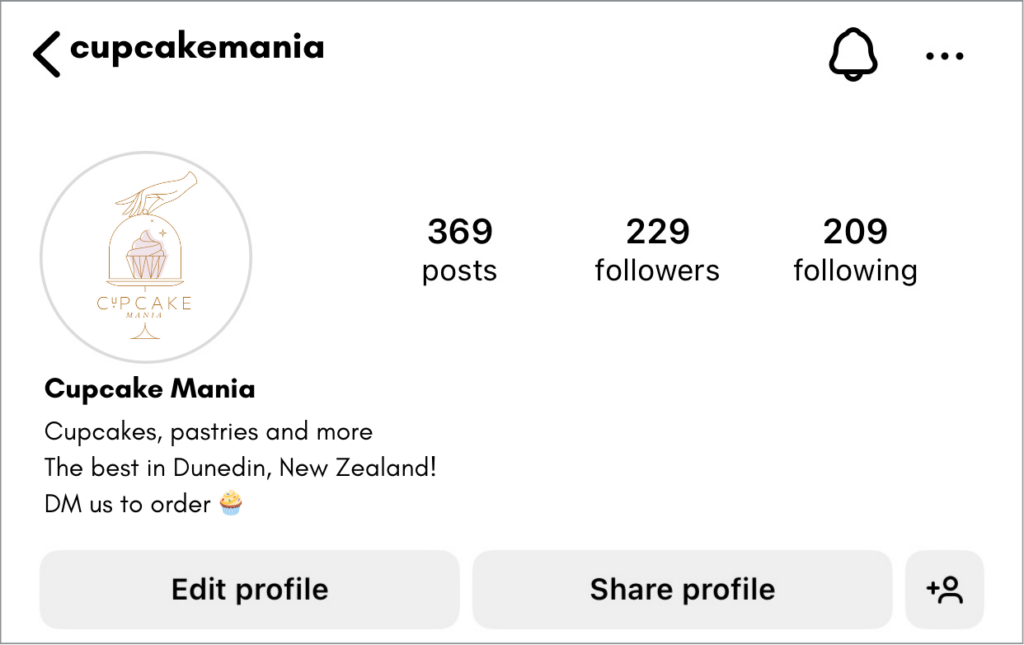
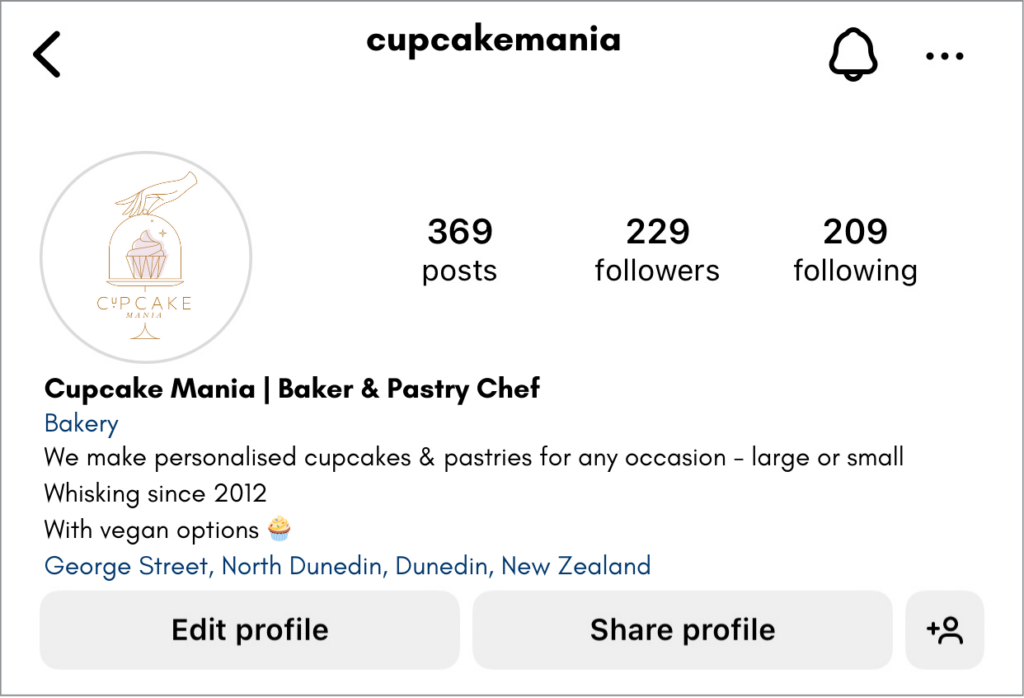
For our examples, we will use a bakery called “Cupcake Mania”. Currently, the bio looks like this: 

How to improve Instagram bio sample

First step, let’s improve this name by adding a mini description.

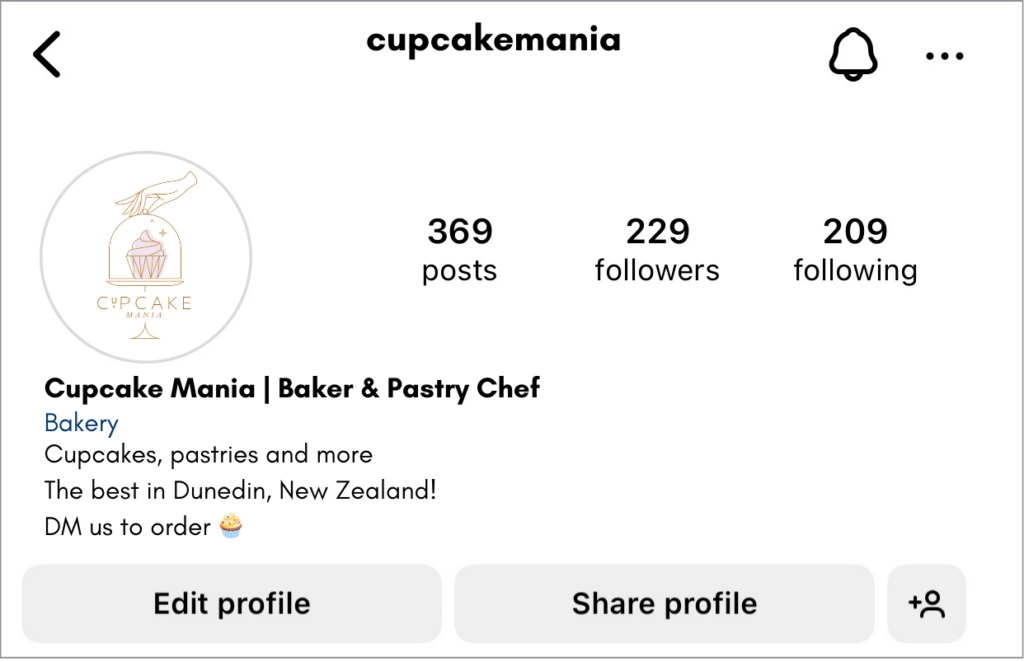
Cupcake Mania | Baker & Pastry Chef

This way, when people search for a baker or a pastry chef, the page has an increased chance of showing up in their results. 

2. Choose a Page Category

In this example, we should have "Bakery" especially if there is a physical shop. Otherwise, you can add "Entrepreneur" here.

Expert tip: Choosing "Entrepreneur" as your page category allows you to access the full music library on Instagram Reels and Stories.

The page category and pronouns are optional and do not count towards the 150-character limit. 

Simply tap on "Edit Profile" and type in that new display name. 

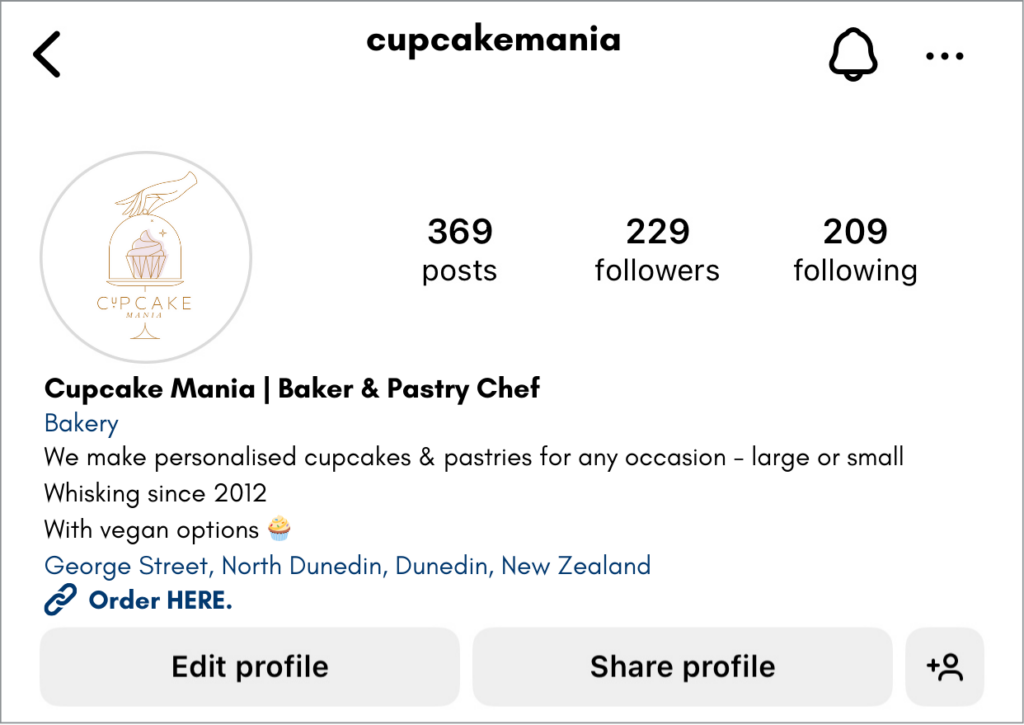
With these simple first steps, it now looks like this:

How to improve IG bio sample

3. Refresh those 150 characters

This limit may not seem a lot, but you’ll later see that you can use other tools to add more details in your bio. Right now, you have to input some crucial information about you or your business that will grab your audiences’ attention. 

- Add a Value Statement

Now that you already have your name/business name and some keywords on how people can find your page, you don’t have to include these on your bio.

You have to decide on a value statement. In other words, what you can offer to your audience. Keep it straightforward.

Value statement example for Cupcake Mania: 

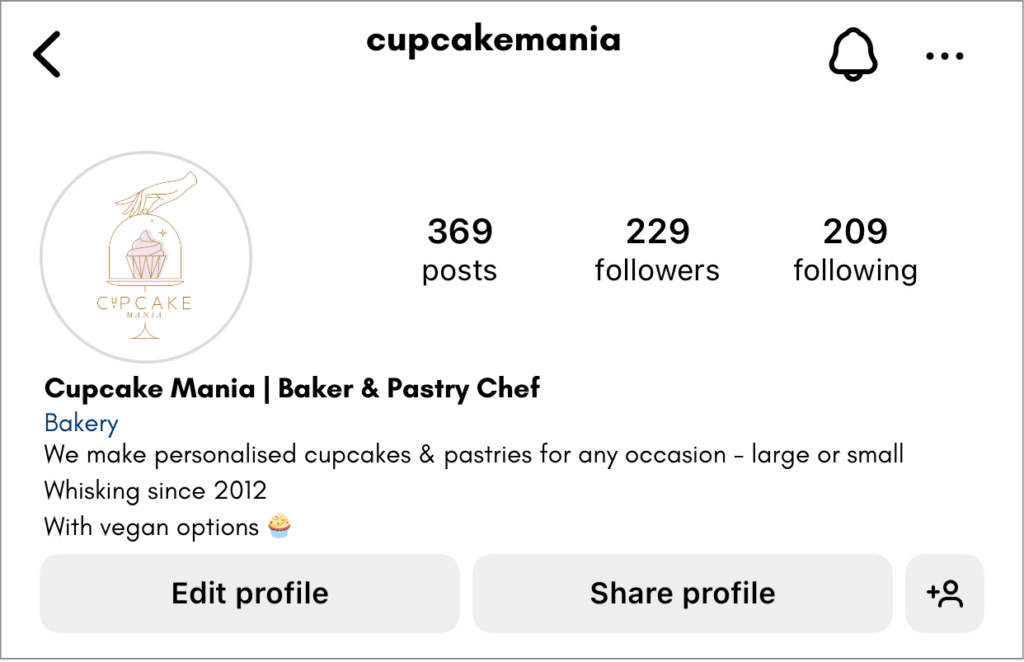
We make personalised cupcakes & pastries for any occasion - large or small

With 74 characters, you were able to let your audience know something new about your business that may be exactly what they are looking for. 

- Build your Credibility

At this point, your audience may think that they’re on the right page if your value statement resonates with them. But how can they trust you? 

Your audience will most likely look at your posts and the number of followers you have to identify whether your page seems trustworthy or not. 

In your bio, you can add information on why your business is credible. 

For our example, you can add something like:

  • Whisking Since 2012 - which shows your experience
  • 100% Vegan Delights - if your target market are mainly vegans
  • Featured in NZ’s Top Bakeries for 2024 - highlight any awards or relevant accreditations

Adding a credibility statement will definitely set you apart from your competitors.

The bio is looking much better already:

Improve IG bio sample

4. Where they can find you

For brick-and-mortar businesses, you can include a location link that shows on your bio. 

You can do this on an Instagram business account by selecting "Business Address" still within the "Edit Profile" function and filling out the relevant information about your location. Once you’ve saved the changes, the address will be visible to anyone on Instagram. 

It will appear as a linked address that opens up real-time directions to your store. 

For example, Cupcake Mania adds its business location:

Improve Instagram bio sample

5. Maximise the use of Links

Instagram 2024 bios allows you to add 5 clickable links. Although these do not count toward your character limit, only the first link is automatically visible to your audience. The next 2-5 links are then shown once the "see more" option is clicked. 

Most will select their website to be first - could be the homepage or a specific page within the site. After web pages, you may want to include your other social media pages.

- Linktree

A solution to this “only one link immediately visible” challenge is Linktree, also known as the "link in bio tool". 

With this free tool, you can create and customise your own single link that serves as a landing page for an unlimited number of links to various web pages, social media channels, and other online content you’d like to share. 

If you cannot decide on which link you would like to spotlight, you can add all your relevant links to your Linktree and direct your audience to different destinations from a centralised location.

Cupcake Mania adds a customised Linktree to their bio:

Improve my Instagram bio sample

6. Add an Action Button

When you open an Instagram page, you will usually see the "Follow" and  "Message" buttons. Another thing you may see in that bio space for business pages is an Action button. 

To add an action button, open your Instagram business profile, select "Edit Profile", under "Public business information", you can find action button options:

  • "Contact" - to be contacted via phone or email
  • "Call" - to be contacted via phone only
  • "Learn More" - to add lead forms
  • "Book Now" - to book an appointment
  • "Reserve" - for reservations
  • "Order Food" - to get food deliveries or takeaway from your business

To add a "Contact" button, check that you have contact options such as your phone number and email. Ensure that the "Display contact info" toggle is switched on, which will then create a "Contact" button beside the first two buttons on your bio.

Other action buttons require you to have an existing account with a third-party app, website, or partner to use these.

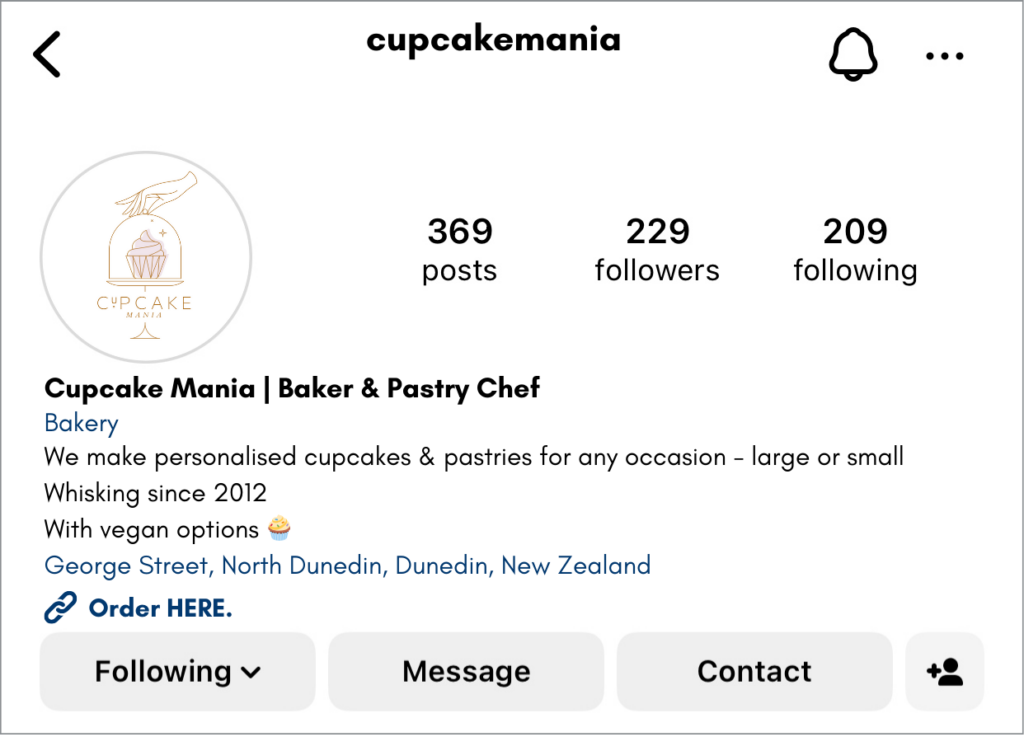
Cupcake Mania's bio now looks like this to their followers:

Improve Instagram bio with linktree

7. Final Edits & Review

You have now included the key items you want your Instagram bio should have - a value and credibility statement, your location, relevant links that redirect your audience to your preferred landing page, and a contact button that makes it easy to reach you. 

Use a few relevant emojis to add colour to your bio or use them as a way to bullet your information.

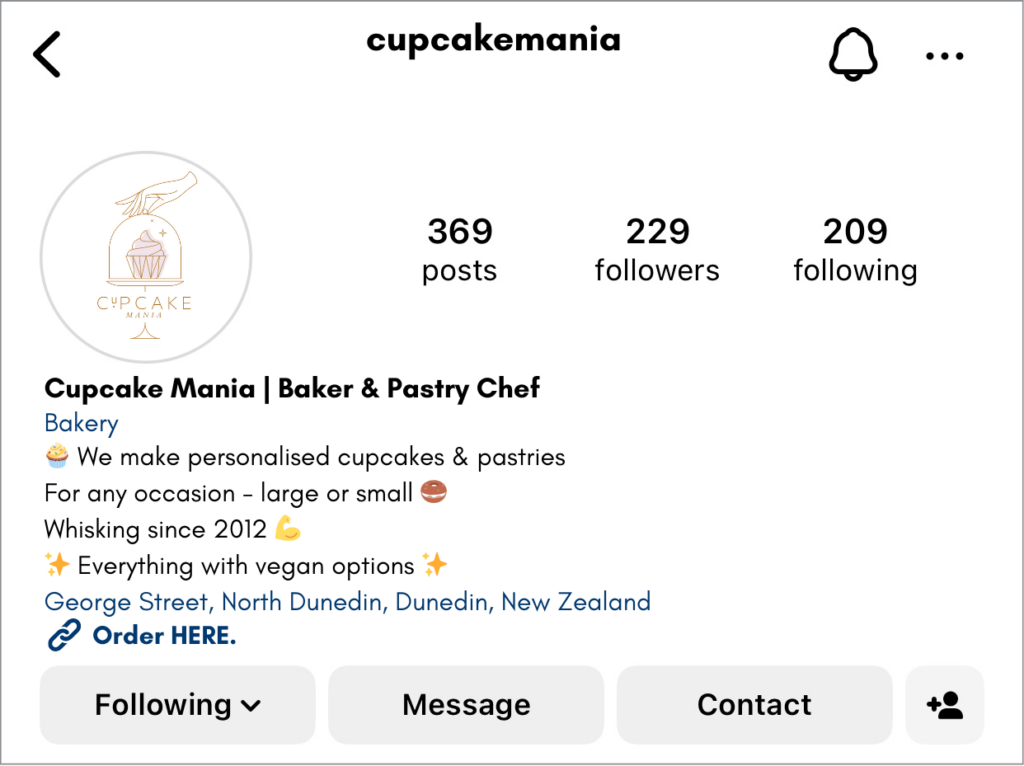
Finally, you can always edit your bio by identifying and applying your brand’s voice and writing catchy phrases to further get your audience’s attention. Here’s the final crafted Instagram bio for our example: 

Improve Instagram bio with linktree and emojis


With only 135 characters used here and by knowing how to maximise different Instagram tools, your Instagram bio has been boosted and you will have improved the searchability of your Instagram account.


Unlocking Instagram’s Algorithm: 12 Tips for Boosting Visibility and Engagement

Decoding Instagram's algorithm is crucial for gaining visibility and engagement. In this article, we'll delve into a series of tips and hacks tailored to enhance your Instagram strategy.

1. Value Proposition

This refers to a statement that summarises why a customer should choose your product or service instead of your competitors. 

On Instagram, you’re not just promoting your company. You’re encouraging people to choose YOU and your content over others. 

Make sure that your Instagram bio is optimised to let your audience know what you offer and why they should follow you. Here are some examples:

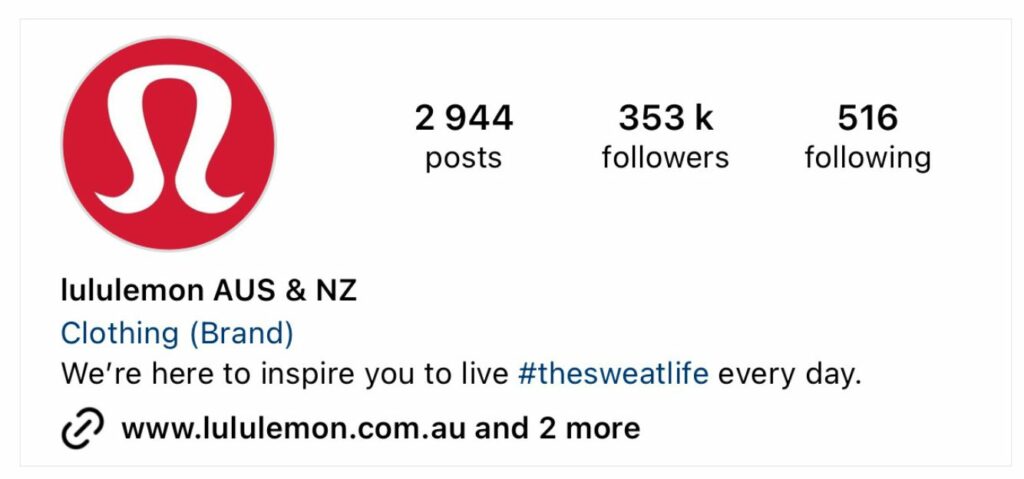
Lululemon's Instagram Bio example for Unlocking Instagram's Algorithm

Lulelemon tells its audience that they provide inspiration and includes a hashtag which allows people to easily view related content. 

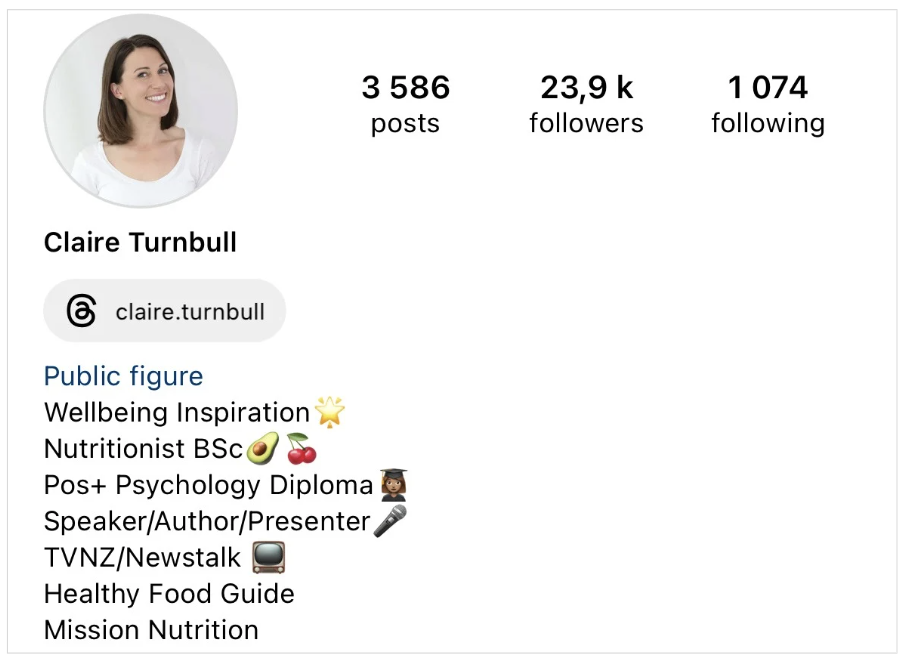
Claire Turnbull's Instagram bio as an example for Unlocking Instagram's Algorithm blog

Claire Turnbull’s bio states her qualifications alongside what users can expect to see.

By doing so, you set the expectations for your audience, and will gain followers who enjoy your content and will engage with them.

2. Story Highlights

Another Instagram feature you need to take advantage of is its Story Highlights. 

Highlights are collections of your stories that are pinned at the top of your page, just below your bio. To add your highlights, you can click on the "New" circle and choose stories from your archives. Name your collection and add a cover either from a thumbnail on the story or a custom image from your device’s album. 

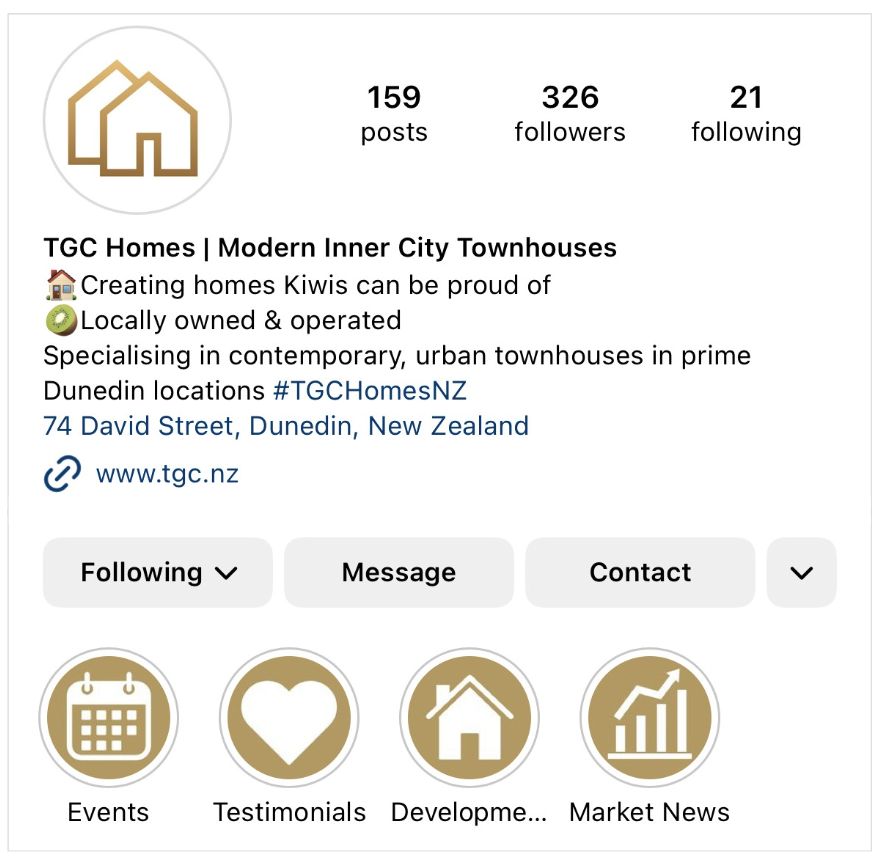
Here’s an example of a property developer’s story highlights with customised thumbnails:

TGC Homes' Instagram bio example for story highlights on Unlocking Instagram's Algorithm blog

Your highlights allow you to show who you are and your most relevant or appealing content. This enhances viewer navigation and extends the visibility of your Instagram stories beyond their 24-hour lifespan, offering a lasting impression of your curated collection.

Highlights contribute to a well-organised, engaging, and visually appealing page that can, in turn, positively influence Instagram’s algorithm.

3. Posting Reels

Instagram’s algorithm will show your short-form video to non-followers, making it an ideal way to grow your IG followers.

In May 2024, Instagram updated its algorithm to benefit smaller creators. When using trending music for your Reels, your content will be intentionally shown to a small group of non-followers instead of immediately competing with large pages’ content. If your reel performs well in this subset of viewers, it will be recommended to more people as long as it still has a good performance. Take advantage of this opportunity and get creating high-quality reels. 

Expert tip: When posting Reels on Instagram, make sure that there are no watermarks from third party apps you may have used to edit the video. Otherwise, create your Reels directly on the app. Instagram’s algorithm appears to favour original and high-resolution content. 

4. Avoid Engagement-baiting

Instagram has become strict about what people post; usually prompting warnings to those who use language that urges people to engage with their posts. 

Try to avoid "engagement-baiting". You may have seen posts which say "comment ‘yes’ to claim…", "tag a friend for a free…", or other captions and content which urges their audience to share and/or react to the posts. 

If Instagram’s algorithm detects this on your post, your content may be removed or is ranked lower in the feed.

If you have dedicated followers who look forward to your high-quality content, their active engagement should come naturally.

5. Encourage Engagement

Use these tips to increase the engagement of your posts without violating Instagram’s guidelines: 

  • Ask for your audience’s opinions "Let me know in the comments what you think about…"
  • Be genuine about your intent "If you found this advice helpful, share it with your friends…"
  • Use Instagram’s engagement-driving stickers such as Questions, Polls, and Emoji Sliders. Interactions are a huge factor for the algorithm.
Instagram engagement stickers example for Unlocking Instagram's Algorithm


Expert tip: Comment on your own posts or reply to your own story stickers to encourage others to do the same. Add questions of further context through comments to start conversations and make sure to react and/or reply to all replies.

6. Use of Hashtags

Many people ask - "are hashtags dead on Instagram?". 

Let’s settle this - no, they’re not dead, and hashtags are still recommended. You can add up to 30 hashtags on your post, however, we suggest to only use 3-10 relevant ones.  

Where should you put your hashtags?

You can put them either in the caption or in the comments. Instagram’s algorithms will read those hashtags regardless of the position.

Hashtags enhance searchability and visibility. Use popular and niche-specific ones to reach broader audiences. Also create and use a branded hashtag for brand recognition and simplified content search by your audience.

Taplink conducted research and saw that for accounts with less than 5k followers, posts with visible hashtags in the captions perform better in terms of engagement. So, if you have 5k followers and less, add those hashtags on your caption.

7. Link in Bio

We usually see content that includes "See the link in my bio for…" when we need to refer our followers to external links.

There are ongoing debates whether Instagram is intentionally restricting content that uses these phrases, as this action leads users outside of the platform. 

But is this true? Does telling my audience "click the link in my bio" decrease my engagement?

Well, yes and no.

Instagram has recently updated that users can now add up to 5 links in their bio, but only the first link is visible on your page. 

Leading people to the link in your bio is an effective way to get them to your desired location. However, casual scrollers probably won't stop scrolling to go to a link in the bio. Chances are, they would just keep scrolling. 

For your brand on Instagram, try to limit the use of these phrases. Instead of always using the link in your bio, you can also use the comment section which then enhances engagement. 

8. Engage with Larger Pages

Network or engage with larger pages within your niche boosts your own page. Find similar content and target audiences, likely among pages you already follow. Add thoughtful comments on their content and this may lead to collaborations or shout-outs. Avoid generic messages to maintain authenticity.

9. Repurpose Content

Reposting old content may be tricky when your audience realises that they have seen the posts before and are confused as to why you’re reposting them. The worst that could happen is that they call you out for recycling content if you repeat this often and potentially unfollow your page. 

We think if you select popular content from a reasonable time period before, like more than 4 to 6 months ago, you will be fairly safe to repost and maybe just freshen up the caption. 

Don’t forget to check if there’s any content you can update. For instance, your "2023 Autumn Fashion Tips" that performed well could be updated for this year.

Another tip is to repost or share your content on other platforms.

Always link back to your original Instagram post or page. This way, when people see your content on other platforms, they can go to your main Instagram page and see what other content you share which may appeal to them. 

10. Consistent Posting

Instagram’s algorithm favours pages and accounts that are consistently active and this increases the possibility of your content being shown to your followers and target audiences. 

Consistency in posting schedules not only aligns with Instagram's algorithm but also signals reliability to your audience, reinforcing your brand's commitment and reputation.

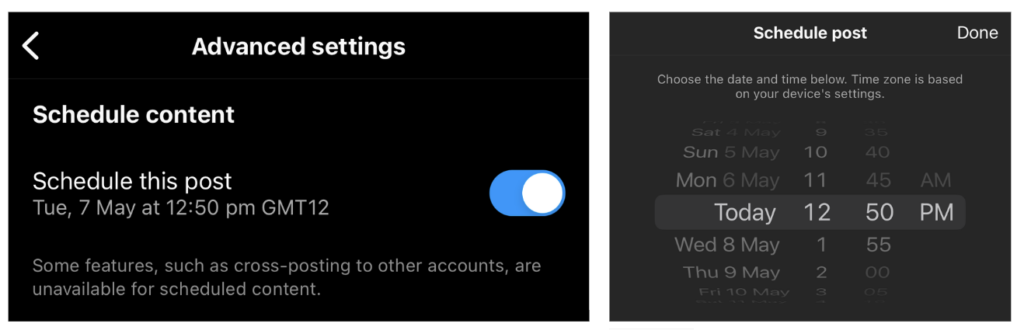
Consider scheduling prepared content for automatic posting, available for posts and reels with a Business or Creator account. 

On the Instagram app, in the prepared post, go to Advanced Settings and toggle the Schedule switch on. Choose the date and time you want your content to be published and click Share. You can also edit or delete these posts by going to Scheduled Content within your menu.

Instructions on how to schedule posts and reels on the Instragram app

You can also schedule up to two weeks in advance using Meta Business Suite. 

11. Quality not Quantity

While staying active and maintaining a consistent posting schedule is advised, prioritise content quality over quantity. Avoid posting solely for the sake of it, as this can overwhelm your audience and diminish engagement. Unsatisfactory content may lead to decreased post performance and be tagged as low-quality by the algorithm.

12. "Am I Shadow Banned"?

"Shadow ban" is usually experienced on X (formerly Twitter) resulting in decreased post reach and engagement. Instagram also encounters this restriction, limiting content visibility to your audience.

Instagram does not technically use the term “shadow banned” but they do provide guidelines on page activities that may cause restrictions on your account. 

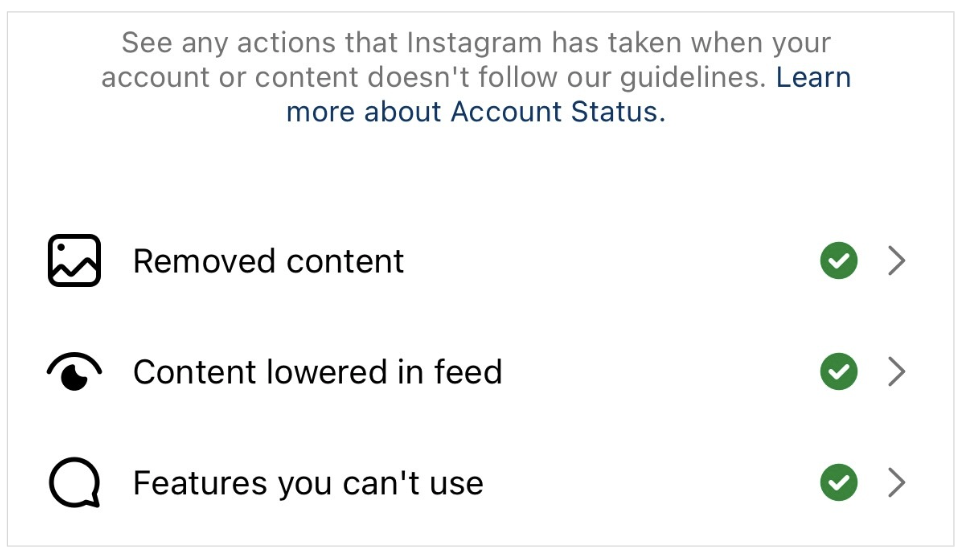
To check your page’s status, go to Instagram - Settings -  scroll down to "Account Status" where you will see this:

Instructions on how to see your account status on Instagram

This lets you know if there are any restrictions on your page and what actions you need to do to fix this.


10 Necessary Steps to Protect Your Facebook Page

Last Updated on Friday, May 5th, 2024

Facebook is a valuable tool for businesses and individuals alike but it's crucial to ensure that your Facebook page is secure from potential hackers. Cybersecurity breaches can harm your reputation, damage your business, put sensitive information at risk and cost you time and money. Therefore, it's essential to take steps to protect your Facebook page from being hacked.

Here are our top ten necessary steps to secure your Facebook Page:

Step #1  Use strong passwords

Ensure your passwords are a random mix of at least 14 to 16 characters - letters, numbers and symbols, and avoid using common phrases or words.

So long as you are using a strong password – along with 2FA – you shouldn’t need to change your password that often. However, some security experts suggest changing your password every 90 days or at least once a year.

You can also consider using a password manager like Bitwarden or 1Password for secure password management across devices. Keep in mind that while convenient, built-in managers may pose security risks if your device is stolen.

Step #2  Enable two-factor (2FA) or multi-factor authentication (MFA) – a MUST

Two-factor authentication is an additional layer of security that requires a code to be entered along with your password. This code is usually sent via text message or generated through an app. By enabling two-factor authentication, you can significantly reduce the risk of your Facebook account being hacked.

In fact, if you’re running Meta ads, your ads will quite possibly perform better so long as EVERY admin of your Page has 2FA set up. And you might see an ever so slightly better organic reach for your posts too.

You access 2FA under your Password and security settings.

Although most use SMS to receive a code via text message for 2FA this is actually not the most secure way to set up 2FA as phone numbers can be spoofed.

So, for optimal security, it’s much more effective to use an Authenticator app. Google Authenticator (iOS or Android) and Duo Mobile are among the top authenticator apps.

Many online services not just Facebook - Amazon, Dropbox, Google, PayPal, Slack and Twitter all support authenticator-generated codes as an alternative to SMS-based codes. All the apps can be used for multiple accounts, and you don't need to have a cellular connection, or even Wi-Fi access, on your phone for the codes to work.


Step #3  Do not share your login credentials

Never ever share your login credentials with anyone, for any reason. To share access to your business page, use Business Manager or Business Suite and add Admins with appropriate roles and ensure they also have 2FA set up.

Step #4  Monitor your account activity

Monitor for any suspicious or unauthorised access. Check for any unusual login locations, device types, and login times. Get in-app notifications and emails about unrecognised logins by going to Password and security settings and select ‘Login alerts’.

Also check your old logins and remove all logins on devices you no longer have access to or don’t recognise.

Step #5  Account access

Regularly review who has access to your account and remove anyone who has moved on or should no longer have access.

Also review third-party apps connected to your account. Remove old and unnecessary apps or manage their access to your information.

Step #6  Keep your operating system and software up-to-date

Make sure to keep your operating system and software up-to-date, including your web browser, antivirus, and other security software. Regularly updating these components will protect you from known security vulnerabilities and improve the overall security of your system.

Step #7  DO NOT click on suspicious links

Hackers often use links to gain access to your Facebook account. Avoid clicking on suspicious links sent via DM and/or email – from Meta, an unknown source or even your trusted friends as they could have been hacked. And especially not if they contain a message urging you to click.

Phishing is rampant these days and the scammers are getting cleverer by the day; it’s all too easy to fall prey to something that looks too good to be true. If in doubt, do not click! And, if sent via email, check the full sender’s email – often the scammers don’t even bother to cover the actual email address – which could look totally suspicious or could look plausible but will have something odd about the address like an extra part to the domain like this “mail.nzpost.co.nz”.

You can check legitimate Facebook emails by going to your Password & Security settings and selecting Recent emails under Security checks.

Step #8  Don’t share password details

These are common are where hackers try to trick you into revealing your login credentials or other sensitive information. Don’t respond to emails or messages requesting your password or other login details.

Step #9  Log out of your account after use

Always log out of your Facebook account after using it, especially if you’re using a shared or public computer.

Step #10  Large following? Consider hiding

You might want to hide your Friends and Followers on your personal profile if you have a large number of them. You can do this by going to your account settings, scroll down to Audience and visibility and manage who can see your Friends and Followers. This is particularly important for profiles that get impersonated as it looks very enticing to a scammer to be able to act as you and try to scam your entire network.

You can also “lock” your profile so that only your friends can see your shared information and posts. Go to your account settings and scroll down to Audience and visibility to see 'Profile locking'.

Let’s connect!

Make sure you’re following my Facebook,  Instagram and LinkedIn page to stay up to date with all things social media marketing.


Instagram’s Latest Updates for 2022

Instagram has kept us hopping this year! Our team has noticed several new features added to Instagram's reels, posting functionality, API, and more... Let's have a look at the latest updates and how they can work in your favour.

Pinned Posts or Reels

Instagram has launched a new feature to allow users to pin up to three posts or Reels to the top of their profile grid. For users of Facebook, this tool will be familiar as we have always been able to pin posts to the top of the Page.

The ability to pin a specific post to your profile is a welcome feature for users who want to highlight their favourite posts that may have been buried somewhere in their photo grid. The feature could also be useful for those who post frequently but want to highlight a specific post. Currently users have the option to pin Stories to their profile and now also their posts or Reels.

How to Pin a Post:

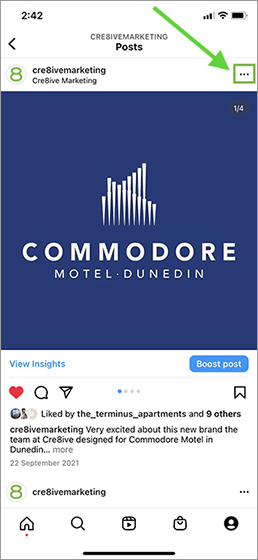
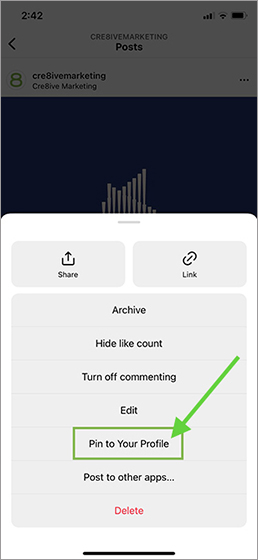
  1. Select a photo or reel on the navigation page
  2. Click on the three dots in the top right corner
  3. Select “Pin to your profile” and that’s it!
Cre8ive Marketing Dunedin Digital Marketing Agency Instagram Post
Cre8ive Marketing Dunedin Digital Marketing Agency Instagram Pin to Profile


Once you have pinned a post, it will appear on the top of your profile page with a push-pin icon. To unpin a post, enter your profile page, repeat the steps above and select “Unpin from your profile”.

Auto Captions on Reels

Want to watch a Reel without disturbing others? Auto captions function in Instagram can help you do that.

Rolling out earlier in 2022, this feature will let viewers watch a Story or Reel without having the need to turn on their volume. Anyone speaking in the video – their words will be automatically displayed in the caption. By default, it's turned on to make Reels more accessible and easier to consume.

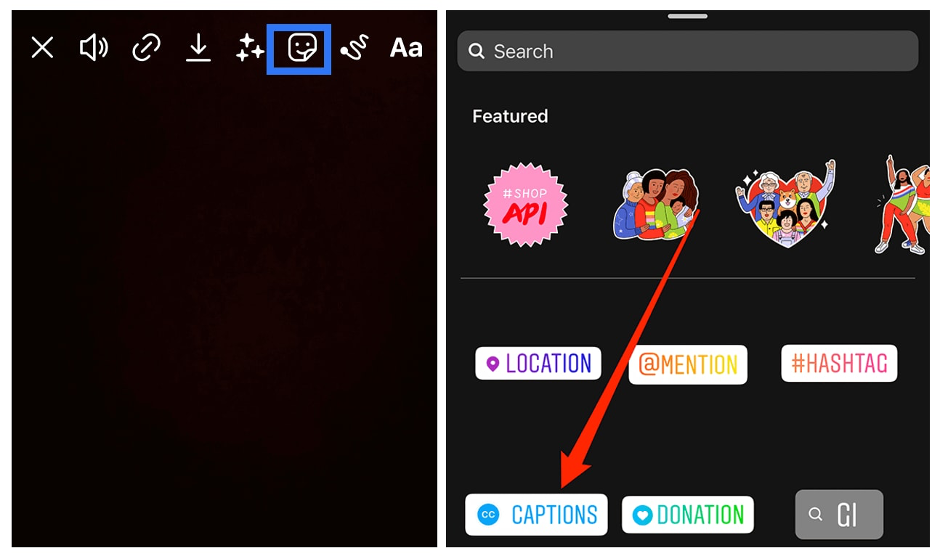
To turn on the auto caption for the Reel you are watching, simply click on three dots on the top right corner of the Reel -> manage captions -> turn on the “Captions” button. To add Auto captions to the Reels you are creating, click the “sticker” button and select “CAPTIONS” in the list.

Cre8ive Marketing Dunedin Digital Marketing Agency Instagram Auto Caption


90 Second Reels are Here

Now you can create a longer video, up to 90 seconds. The time limit expansion should provide users the opportunity to better communicate with their audience and showcase their offerings.

"You will have more time to share more about yourself, film extra behind-the-scenes clips, dig deeper into the nuances of your content, or whatever else you want to do with that extra time," says the official Instagram blog post.

New Stickers for Reels

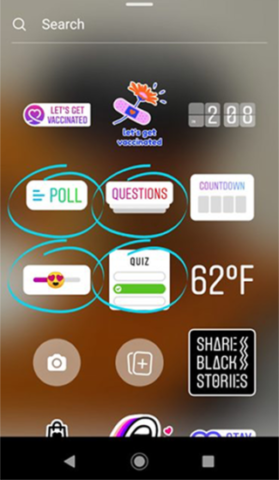
The Poll, Quiz, and Slider stickers, previously only available in Stories, will now be available on Reels as well.

Try to poll your audience on questions, test your viewers’ skills, and ask them to share their feelings by adding Instagram stickers to your Reels.

No matter the content of your Reels, these will increase a level of interaction for your audience.

Cre8ive Marketing Dunedin Digital Marketing Agency Instagram Reel Sticker


Templates for Reels

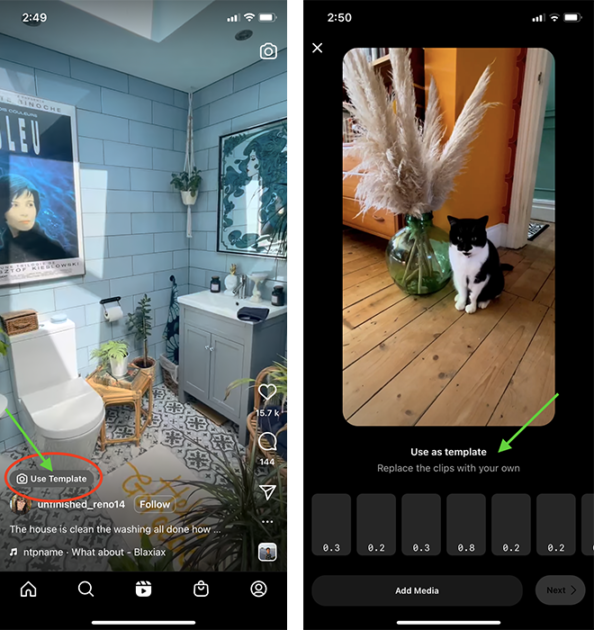
Instagram now allows you to select the existing Reels and use them as templates to create your own!

When you find a Reel that has a “Use template” button above the poster’s user name, you can click on that button and enter the template editing interface.

Simply on “Add media” button and add or replace media sources inside. You can add both photos and videos as materials for your new Reel. Once you have finished, you add stickers, audio, and special effects as normal.

With this function, it is now easier than ever for you to easily create Reels without having to spend all your time editing and creating them from scratch.

Cre8ive Marketing Dunedin Digital Marketing Agency Instagram Use Templates


Import Own Audio to Reels

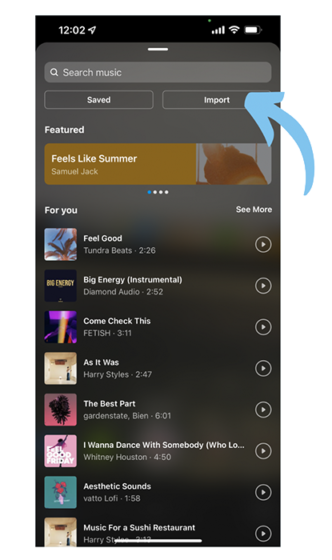
The updated Instagram now allows you to add your own audio (voiceover, sounds, music, conversations, etc.) into your Reel-making!

You can save the desired audio file to your local mobile storage and add it as your own audio to your Reel. You will see the new button called “Import” next to the “Saved” button once you click on the “Music” icon when making your Reel.

Cre8ive Marketing Dunedin Digital Marketing Agency Instagram Import Audio


API Opened Up for Reels

With Instagram Meta announcing that it is launching the Reel APIs for external uses, the third-party platforms will be able to create and schedule Reels and manage related activities in their Instagram accounts.

With API access, third-party platforms like Hootsuite, Later and Sprout Social can keep track of their social posts much easier and they can track cross-platform posts and activities in one place. The current API enhancements include Content Publishing, Insights, Comment Moderation, Hashtag Search, Business, Discovery, Mentions, Promote API, and Instagram Basic Display API.

Reels Cross Posting

Want to create a Reel for different platforms? Instagram’s new cross-posting function makes it easier to do that. Now you can automatically cross-post Instagram posts, Stories, and videos (Reels) to Facebook.

To check your cross-posting settings, tap your profile picture, then the menu icon. Choose “Settings” -> “Account” -> “Sharing to other apps” and then you can see the accounts liked to your IG account.

A great way to re-purpose your content and extend your reach!

More NFT Testing

Another new feature coming on Instagram Meta! Instagram Meta is now testing non-fungible tokens (NFTs). The token collection is expected to include art, images, videos, music, and trading cards. The initial test involves a small select group of U.S.-based creators and collectors. For this test phase, they're expanding access to more countries, so it won't be long until NFTs are widely available on Instagram.

Provide/Get Quotes for Services on IG

One more new function on Instagram Meta – they are testing a “Get Quote” button with select businesses. This button will allow the users to create questions in their profile or add a “Get Quote” sticker to their Stories to ask their customers questions.

Once customers fill out the questionnaire, they can then quickly request a quote from the business about a product or service. This new feature facilitates e-commerce leads and business-customer conversations.

Instagram's New 'Notes' Test

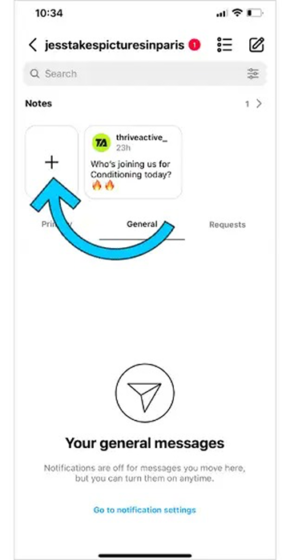
Instagram is also testing a new message function called “Notes”.

On the top of your inbox page, the user can create notes and see the notes created by their followers whom they have also followed back. You can create and share a note by clicking on the “+” button, inputting the message (no more than 60 characters), and sharing it with whoever you want to send the messages to.

Replying to a note will trigger a chat thread with the note creator, which will be private and only accessible to two of you. The notes are going to remain on your page for 24 hours and will be deleted automatically after that.

As it is still in the testing stage, it may not appear on all the users’ devices now but it is already on its way!

Cre8ive Marketing Dunedin Digital Marketing Agency Instagram New Notes

InShot: All-in-one Video Editor


We know there are a multitude of benefits that video can have for businesses. However, more often than not people feel out of their depth when creating video content. Inshot is a video editing app which can be a game-changer for businesses wanting to create engaging content for their audience but just don’t know where to start.

InShot is a feature-rich app that lets you drill down into all sorts of editing and enhancement options. Just about everything you’d want to edit on a video can be done within this one app, and there are all different payment options so you can invest as much or as little as you want.

Some of the video editing features that InShot includes are:

  • Video trimming
  • Video splitting
  • Merging video clips
  • Importing photos or images
  • Applying various filter effects
  • Adjusting speed of video
  • Adding music or sound effects
  • Adding voice-over effects
  • Adding animations, stickers or text to videos

Steps to using InShot Video Editing App:

1) Download the app

First off, you’re going to need to download the free app from either the Apple store or Google play. 

2) Import and edit videos and images

The InShot app serves as a 2-in-1 editing tool because you can also edit photos. When you open the app, you’ll be asked to choose between importing photos and videos, editing photos and videos, or making a collage.

Once you select a photo or video to edit you should first adjust the canvas. For example, we recommend 1:1 or the square aspect ratio for video posts on Facebook and Instagram and 9:16 for Reels/Stories. From here you can crop it, trim it, add a background or integrate other visual and sound effects. These basic video editing tools are pretty decent for a business but there are far more exciting tools on offer.

3) Add sound and music

After you’ve made basic edits to your photo or video, you can then add sound effects, voice-over effects or music. InShot gives you the option to import a song from your device, or choose from the app’s music collection.

After you’ve selected sounds and music, you can control the volume of each using sliders.

4) Add text

Next, you’ll be able to add text onto the video. There is a wide array of font styles and colours to choose from. The text can be moved around the screen to get the perfect placement. InShot allows you to select start and end times for when you want the text to appear and disappear in your video. 

5) Add  animations and stickers

Inshot allows you to add custom animations, stickers and GIFs to your video for that fun, personal touch. 

6) Save and share

Once you’ve finished editing your video, all you need to do is hit the ‘save’ button in the InShot app. This will begin the rendering process, which may take some time. Once rendering and conversion is complete, the video will be saved and can be easily accessed in your Inshot gallery. From here you can share it directly to your social media channels.

InShot Pricing

The free version of InShot has a wide variety of tools you can access. However, if you like the app and plan to use it a lot, you’ll probably want to upgrade at some point, or at least spend some money on the enhancement packs you’ll use over and over. You can either do one-off purchases of enhancement packs or be a subscriber.

InShot Pro is the app’s premium version and it doesn’t have any limits on the effects, filters, stickers and transitions you can use. Plus, you won’t see the InShot watermark on your creations and there aren’t any ads.